Labels: Array;
The Labels property determines labels for cylinder axis major tick marks.
Use JSON to set the property value, and the getLabels method to get the property value.
To execute the example, replace body of the createGaugeAxis method on the Example of Creating the Cylinder Component page with the script that creates a cylinder axis with new settings:
// Create a cylinder axis
var createGaugeAxis = function() {
    var axis = new PP.Ui.CylinderGaugeAxis({
        ParentCylinder: cylinder, // Parent cylinder
        MajorTicksCount: 6, // Number of major axis tick marks
        Width: 450, // Axis width
        Height: 250, // Axis height
        Min: 0, // Minimum axis value
        Max: 10, // Maximum axis value
        LabelStyle: new PP.Style(), // Axis tick mark style
        Labels: this.getAxisValues(0, 10, 6),
        LabelsMode: PP.Ui.AxisLabelsMode.Custom,
        ValuesMode: PP.Ui.AxisValuesMode.MinMax, // Axis value display mode
        Position: PP.LTRB.Right, // Place axis to the right
    });
    cylinder.draw();
    // Set axis
    cylinder.setAxis(axis.getSettings());
    // Refresh cylinder axis style
    this.applyStyleForAxis(axis);
    // Refresh cylinder axis
    this.updateAxis(axis);
    axis.redraw();
}
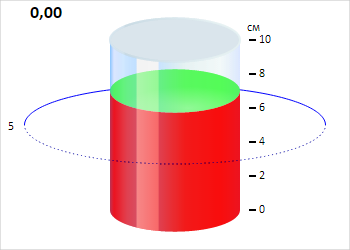
After executing the example a cylinder axis is created with new labels and without minor tick marks:
See also: