getChangedMeasures();
The getChangedMeasures method returns changed table dimension elements.
To execute the example, the HTML page must contain the DataGrid component named grid (see Example of Creating the DataGrid Component). Move a column with the id identifier to the position to the left of the column with the popul identifier, output identifiers and names of all table columns in the direct order:
function printColumns() {
    // Output all table columns
    var columns = grid.getChangedMeasures().Structure.Columns;
    if(columns) {
        console.log("Table columns:");
        for(var i in columns.Column) {
            var column = columns.Column[i];
            console.log("%s. %s, «%s»", i, column.Name, column.Title);
        }
    }
}
// Get manager for controlling of table column move
var columnMoveMgr = grid.getColumnMoveMgr();
// Move column table
columnMoveMgr.moveColumn("id", "popul", "left");
printColumns();
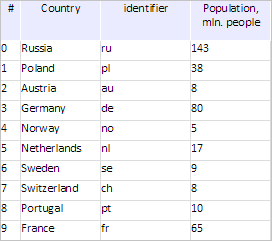
After executing the example the column with the id identifier is moved to the position to the left of the column with the popul identifier:
The browser console displays identifiers and names of all table columns in the direct order:
Table columns: VM9374:6
0. num, «№» VM9374:9
1. country, "Country" VM9374:9
2. id, "Identifier" VM9374:9
3. popul, "Populationm, mln people"
See also: