VerticalExpandVolume: Number
The VerticalExpandVolume property determines how many more columns (at the top and at the bottom) will be processed when executing a request to data source.
Use JSON or the setHorizontalExpandVolume method to set property value, and the getHorizontalExpandVolume method to get the property value.
Default property value is 5.
To execute the example, the HTML page must contain the TabSheet component named tabSheet (see Example of Creating the TabSheet Component). Scroll the table downward, and change the scrollbars appearance so that they do not cover the whole table:
// Set the number of columns in asynchronous mode clipboard
tabSheet.setVerticalExpandVolume(2);
// Get vertical scrollbar element
var hScrollBar = tabSheet.getVScrollBar();
// Scroll the table vertically
hScrollBar.scrollTo(50, True);
// Change appearance of scrollbar panels
tabSheet.setIsScrollBarPartial(True);
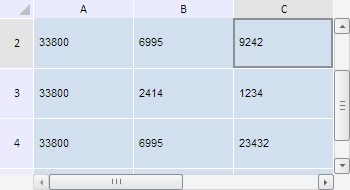
After executing the example the table is scrolled 50 pixels down, clipboard size in asynchronous mode for the table columns is set to 2, and the scrollbars do not cover the whole table:
Seebsp;also: