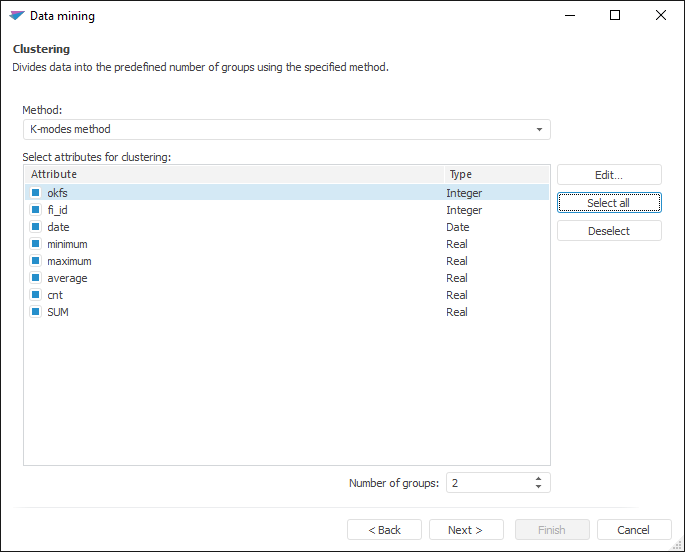
This type of analysis divides data into specified number of groups by using the specified method of clustering.
To work with the Clustering analysis:
NOTE. For method calculation, selected data must contain at least one attribute and three observations, excluding titles. If data source is:
- Regular report. Title is the first row in the selected range.
- Workbook. Titles are series names.
- Express report, dashboard, data table. Titles are column headers.
Set analysis parameters:
The following operations are available in the dialog box:
 Select attributes for clustering
Click the Next button to go to the next page of the wizard.
Execute required operations with analysis results.
The analysis results can be saved to a file, printed or inserted on the regular report sheet. For details see the Working with Analysis Results section.
Example of the Clustering analysis results:
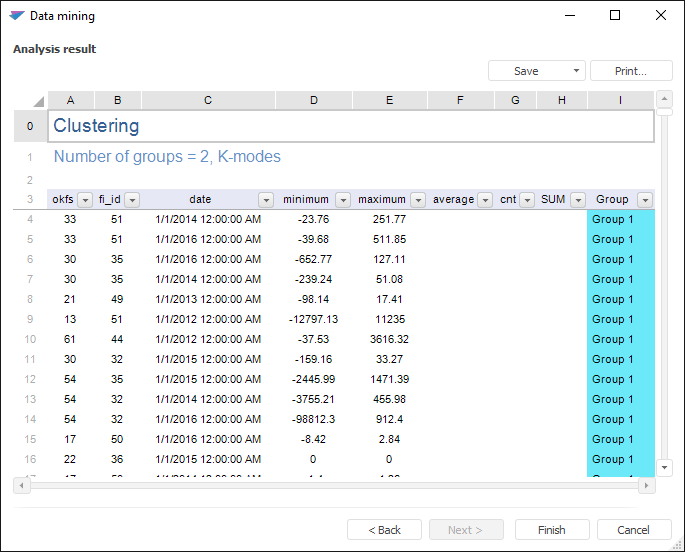
If warnings occurred during the analysis, the Warnings additional tab is displayed.
See also:
Selecting Analysis Type | Kohonen Self-Organizing Maps | K-Modes Clustering | ISmKmeansClusterAnalysis | ISmSelfOrganizingMap
