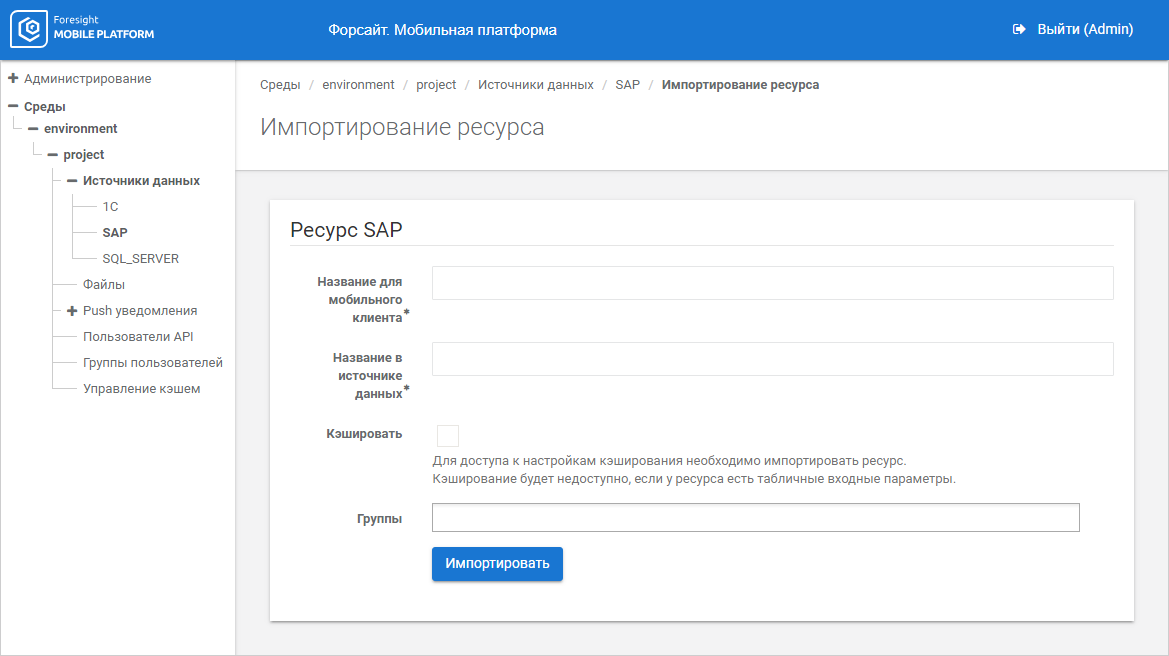
To import resource, set options:
Resource import options depend on data source:
Mobile Client Name. Enter resource name containing allowed URL characters. The parameter is used in requests to get resource data. The box is mandatory
NOTE. On resource import, the value in the Mobile Client Name field must match with the repository identifier.
Data Source Name. Enter resource name specified in data source. The box is mandatory
Cache. Import the resource to access caching settings
NOTE. Caching settings are available only for scalar input parameters of resource.
Groups. Select existing groups of users in the drop-down list, for which resource is available.
Mobile Client Name. Enter resource name containing allowed URL characters. The parameter is used in requests to get resource data. The box is mandatory
NOTE. On resource import, the value in the Mobile Client Name field must match with the repository identifier.
Data Source Name. Enter resource name specified in data source. The box is mandatory
Cache. Import the resource to access caching settings
NOTE. Caching settings are available only for scalar input parameters of resource.
Groups. Select existing groups of users in the drop-down list, for which resource is available.
Mobile Client Name. Enter resource name containing allowed URL characters. The parameter is used in requests to get resource data. The box is mandatory
NOTE. On resource import, the value in the Mobile Client Name field must match with the repository identifier.
Data Source Name. Enter resource name specified in data source. The box is mandatory
Package. Enter name of synchronous Oracle procedure. The box is mandatory
Cache. Import the resource to access caching settings
NOTE. Caching settings are available only for scalar input parameters of resource.
Groups. Select existing groups of users in the drop-down list, for which resource is available.
Mobile Client Name. Enter resource name containing allowed URL characters. The parameter is used in requests to get resource data. The box is mandatory.
NOTE. On resource import, the value in the Mobile Client Name field must match with the repository identifier.
Data Source Name. Enter resource name specified in data source. The box is mandatory.
Cache. Import the resource to access caching settings.
NOTE. Caching settings are available only for scalar input parameters of resource.
Groups. Select existing groups of users in the drop-down list, for which resource is available.
Mobile Client Name. Enter resource name containing allowed URL characters. The parameter is used in requests to get resource data. The box is mandatory.
NOTE. On resource import, the value in the Mobile Client Name field must match with the repository identifier.
Data Source Name. Enter resource name specified in data source. The box is mandatory.
Cache. Import the resource to access caching settings.
NOTE. Caching settings are available only for scalar input parameters of resource.
Groups. Select existing groups of users in the drop-down list, for which resource is available.
Mobile Client Name. Enter resource name containing allowed URL characters. The parameter is used in requests to get resource data. The box is mandatory.
NOTE. On resource import, the value in the Mobile Client Name field must match with the repository identifier.
Path. Specify part of URL to access the resource. The parameter is used together with the host specified on setting up data source connection.
GET Parameters.
JSON Schema. Enter JSON data. The box is mandatory.
Jq Transformation. Enter result of jq transformation.
Cache. Import the resource to access caching settings.
NOTE. Caching settings are available only for scalar input parameters of resource.
Groups. Select existing groups of users in the drop-down list, for which resource is available.
Mobile Client Name. Enter resource name containing allowed URL characters. The parameter is used in requests to get resource data. The box is mandatory.
NOTE. On resource import, the value in the Mobile Client Name field must match with the repository identifier.
Start Date. Set period start date in MS Exchange Server calendar.
End Date. Set period end date in MS Exchange Server calendar.
Groups. Select existing groups of users in the drop-down list, for which resource is available.
Mobile Client Name. Enter resource name containing allowed URL characters. The parameter is used in requests to get resource data. The box is mandatory.
NOTE. On resource import, the value in the Mobile Client Name field must match with the repository identifier.
Path. Specify part of URL to access the resource. The parameter is used together with the host specified on setting up data source connection.
GET Parameters.
Groups. Select existing groups of users in the drop-down list, for which resource is available.
Mobile Client Name. Enter resource name containing allowed URL characters. The parameter is used in requests to get resource data. The box is mandatory.
NOTE. On resource import, the value in the Mobile Client Name field must match with the repository identifier.
Object Identifier. Enter repository object identifier.
Object Type. Select object type in the drop-down list:
Cube.
Dictionary.
Table.
Cache. Select the checkbox and determine caching settings.
Groups. Select existing groups of users in the drop-down list, for which resource is available.
After setting up resource import click the Import button. The resource is imported by the specified settings from data source.
The settings display resource's input parameters, for which state and default value can be changed, and caching will be available if the Cache checkbox is selected.
See also:
Import of Data Source Resources | Caching

 SAP
SAP