
 To start the process for execution
The process can be started for execution the unlimited number of times by setting different start parameters. Process parameters are previously set up in the Process Settings and Parameters dialog box.
Starting process for execution is available in the desktop application in the business process setup window, in the object navigator and in business application.
To start the process for execution
Process start parameters can be set in the Start Process dialog box:
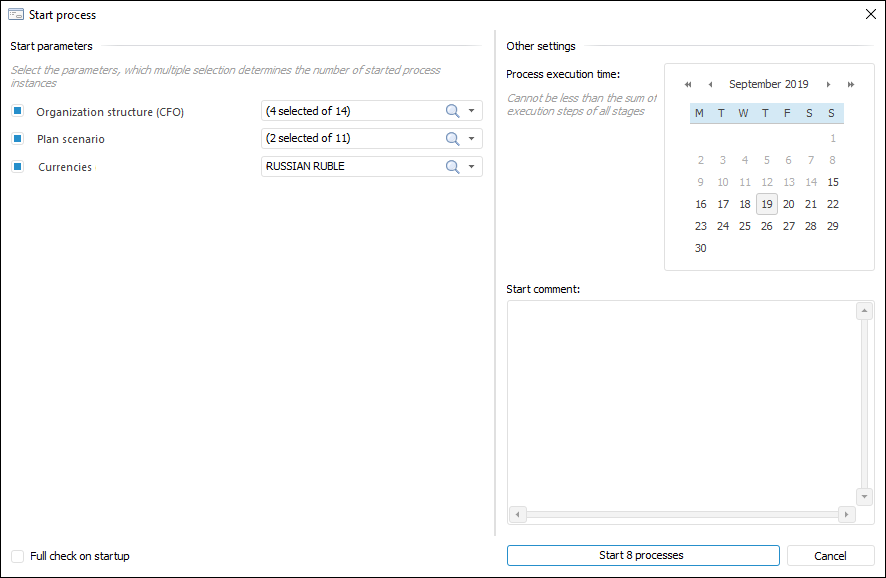
The dialog box contains general parameters of the process and starting options of process instances.
To start the process for execution:
In the general parameters area, select the parameters values:
Process Execution Time. It is selected using the calendar, the value cannot be less than the sum of execution steps of all stages. After this time is reached, the process is considered as expired.
Start Comment. The comment is entered, if required.
Full Check on Startup. When checkbox is selected, all nested processes and their steps are checked to avoid errors. If the checkbox is deselected, the check is executed without checking steps in nested objects.
In the Start Parameters area select values of each parameter by selecting elements in the drop-down lists. Their multiple selection determines the number of started process instances.
NOTE. The list of startup parameters is set on setting up process parameters.
Click the Start N Processes button where N is the number of started process instances. The number of started instances is equal to the number of start parameters combinations, which depends on the selected checkboxes and selected parameter values.
The example above shows selected checkboxes for the following parameters: Organization Structure (four organizations), Plan Scenarios (two plan scenarios) and Currencies (one currency). So, the number of combinations is seven and seven process instances for each parameters combination will be started. If checkbox is deselected, the value of non-selected parameter will be selected in the list at step execution.
The number of started process instances is defined on the button, for example, Start 8 Processes.
Then, to execute started process steps, open the Process Monitoring dialog box.
NOTE. The running processes are executed at the server or user local computer. By default server runtime is set up for running processes.
See also:
Process Execution Monitoring | Executing Process Steps | Setting Up Process Tree Layout
 Start button in the Start group on the Process ribbon tab.