In the desktop application:
Select the User > Add Domain User main menu item.
Select the Add Domain User context menu item.
In the web application:
Select the Add Domain User item in the drop-down menu of the
 Create button on the toolbar.
Foresight Analytics Platform uses information from domain directory service or global directory for working with domain security subjects.
To connect a domain user in the Users section:
In the desktop application:
Select the User > Add Domain User main menu item.
Select the Add Domain User context menu item.
In the web application:
Select the Add Domain User item in the drop-down menu of the Create button on the toolbar.
NOTE. When roles of information security administrator and application administrator are separated, only the application administrator can create domain users.
After executing one of the operations a domain user selection dialog box opens:
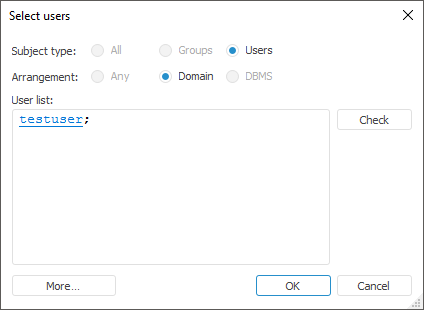
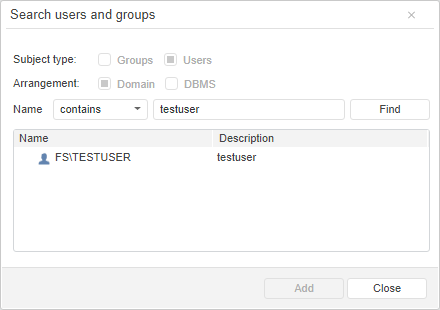
For details about how to work with dialog boxes of domain user selection, go to the Select Users and Groups section.
NOTE. When a domain user is selected, the Subject Type and Arrangement radio buttons are not available in dialog boxes.
After the required users are determined, click the OK button, after which a dialog box of account creation opens:
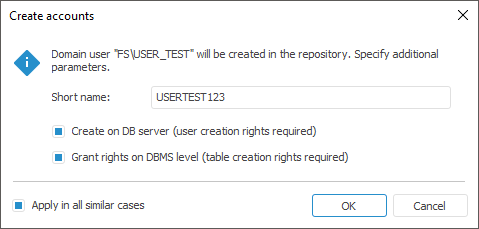
NOTE. The Create Accounts dialog box is not displayed for the users who have already been created in the repository.
When the Apply in All Similar Cases checkbox is selected, for all domain users to be added to platform repository the selected actions will be applied without any additional requests.
NOTE. Domain users are also added to the user list if they have been added to a group or to a privilege holders list.
On working with PostgreSQL DBMS to add a domain user, set the LDAP/SSPI or GSS API authentication type.
LDAP/SSPI is set by the settings of PostgreSQL server.
GSS API can be set via the Fore language.
See also:
Creating User Accounts and Working with Them | Creating and Editing User Account | Creating a Service User

 Add user short name