Integration with the Python language enables the user to extend functionalities of Foresight Analytics Platform in the Modeling and Forecasting, Time Series Analysis, Reports tools. The Python functions are applied in the uniform formula editor.
NOTE. Integration with Python from 3.5 to 3.8 is supported. The bitness of Python and Foresight Analytics Platform must match.
Steps for Python integration differ depending on the operating system in use:
For Python integration on Windows OS:
Download Python distribution file.
Install Python on the same computer where the Foresight Analytics Platform desktop application is installed. If Python is supposed to be used in the web application, install Python on the computer where BI server is located.
Select the Add Python 3.5 to PATH checkbox in the Python installer to add a path to the folder with installed Python in the Path system variable.
Therefore, Foresight Analytics Platform is integrated with Python. All executed scripts must be located in the folder with installed Foresight Analytics Platform.
To specify an additional folder with scripts:
Create a PythonPath string parameter in the registry and set up the required path to the additional scripts folder. The parameter is created in the registry key HKEY_CURRENT_USER\SOFTWARE\Foresight\Foresight Analytics Platform\9.0\DevEnv\Python.
Use the IPythonUtils.AddFolderToPythonPath method.
For Python integration on Linux OS prebuild Python source files.
See below an example of Python source files build of 3.6.9 version on Astra Linux CE OS.
Execute the following operations:
Download archive containing source files of Python 3.6.9:
wget https://www.python.org/ftp/python/3.6.9/Python-3.6.9.tgz
Unpack file form archive:
tar xvf Python-3.6.9.tgz
cd Python-3.6.9
./configure --enable-shared --prefix=/opt/python
sudo make altinstall
NOTE. The altinstall command is used to prevent Python binary file replacement which default path is S/usr/bin/python, where S is the Python installation folder path.
Compilation result must be the following:
Collecting setuptools
Collecting pip
Installing collected packages: setuptools, pip
Successfully installed pip-18.1 setuptools-40.6.2
See below the example of Python 3.6.9 integration on Astra Linux CE OS. Make sure that Python source files build is ready.
For Python integration on Astra Linux CE OS:
Check that source files are correctly built and a new Python version is installed.
If the default version was not rewritten in the system, check the current Python version using the following command:
python3.6 --version
Execute one of the operations if the command was not found:
echo export PATH=$PATH:/opt/python/bin >> ~/.bashrc
source ~/.bashrc
Determine a path to Python libpython3.*m.so library which was created using the --enable-shared parameter in Step 3:
echo export LD_LIBRARY_PATH="/opt/python/lib:$LD_LIBRARY_PATH" >> ~/.bashrc
source ~/.bashrc
On the first Python use, the platform will look for the library from the list:
libpython3.8m.so, libpython3.7m.so, libpython3.6m.so, libpython3.5m.so
The platform will use the first found library before the restart. To restart the platform, restart services using the command:
sudo service foresight-httpd2.4-fp9.2 restart
If several Python versions have been installed, execute one of the operations to use the specific library version:
ln -s /opt/python/lib/libpython3.6m.so /opt/foresight/fp9.2-biserver/bin/
In the registry key HKEY_CURRENT_USER\SOFTWARE\Foresight\Foresight Analytics Platform\9.0\DevEnv\Python create a string parameter:
"PythonLib"="libpython3.6m.so"
Save settings to the file with the *.reg extension to the folder /opt/foresight/fp9.2-biserver/bin.
NOTE. The registry key HKEY_CURRENT_USER can be replaced with HKEY_LOCAL_MACHINE if the path to the Python library is specified for all users and not only for the current user.
Connection of static package R allows for extending Foresight Analytics Platform capabilities in the Modeling and Forecasting, Time Series Analysis tools and in the uniform formula editor.
To connect R statistics package:
Install the R package on the local computer and application server, if theTask Scheduler tool is supposed to be used to start modeling problems calculation:
Load R installer.
Load RServe. If you work on Windows OS, use the RServe binary files.
Install R.
NOTE. For details about R package installation, see the R documentation.
After the installation add the path to the S\bin folder to the Path system variable, where S is the path with installed R package.
Install RServe.
NOTE. For details about Rserve package installation, see the Rserve documentation.
If you work on Windows OS, unpack the RServe binary files to any folder.
Copy the Rserve.exe, Rserve_d.exe, Rserve.dll files from the R folder K\Rserve\libs\i386\ to the S\bin\i386 folder, where K is the folder with unpacked RServe binary files and S is the R installation folder.
NOTE. It is not allowed to install RServe on Windows OS using the R interface because the required files will not be copied to the R installation folder.
Start R.
Select the Packages > Install Package(s) main menu item and install the required R packages. If these packages have already been downloaded to the workstation, they can be installed by selecting the Packages > Install Packages from Local Zip-Files main menu item. For details about packages required for R method calculation see the Which Foresight Analytics Platform Methods can be Calculated Using R? section.
In Foresight Analytics Platform specify the path where R package is installed, or server where R package is deployed.
NOTE. This step is necessary if R is installed on the workstation different from the workstation, where Foresight Analytics Platform is installed. If the R package is installed on the same workstation where Foresight Analytics Platform is installed, the path to the R directory will be already specified.
Select the Tools > Parameters item in the main menu of:
The object navigator in the desktop application.
The Time Series Analysis tool in mobile application.
The Modeling and Forecasting tool in the web application. The item is available if any model is opened in the working area.
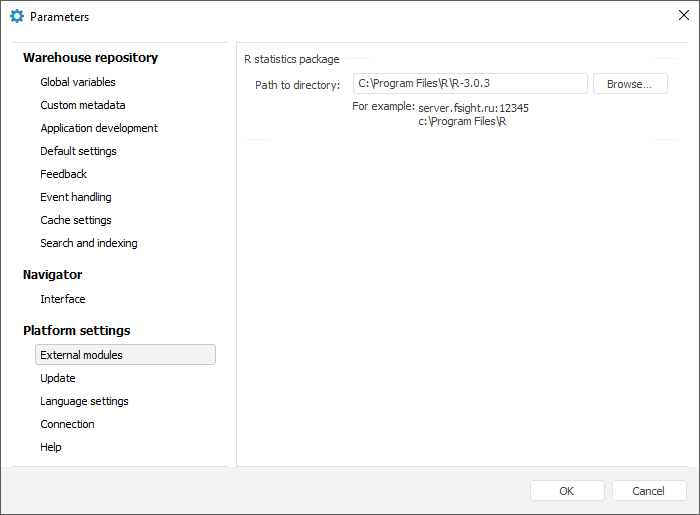
The Parameters dialog box opens.
Go to the External Modules tab and specify the folder where the R Package is installed. For example:
Therefore, Foresight Analytics Platform is integrated with R package.
See also:
Which Foresight Analytics Platform Methods can be Calculated Using R?