In marking stamp it is possible to use the &[DEPARTMENT] and &[NAME] substitutions that can be filled in only from application code on creating a repository connection.
To set substitution values, use the ICredentials.PersonDepartment and ICredentials.PersonName properties available only in in the Fore .NET language.
The ICredentials.PersonDepartment property corresponds to the &[DEPARTMENT] substitution, the ICredentials.PersonName property corresponds to the &[NAME] substitution.
See below the example of defining values for the &[DEPARTMENT] and &[NAME] substitutions in marking stamp. A marking stamp will be displayed regardless of mandatory access or access by security levels applied for the report. To provide a correct example work, the MSServer (Microsoft SQL Server 2008 DBMS) requires the PPRepository repository. A regular report with the REPORT identifier is created in the repository.
To execute the example, follow the steps:
Create a .NET assembly with the .NET form in it.
Add links to the Drawing, ForeSystem, Metabase, Report system assemblies. Import these assemblies from the Prognoz.Platform.Interop system assembly:
For the form:
Imports Prognoz.Platform.Interop.Drawing;
Imports Prognoz.Platform.Interop.ForeSystem;
Imports Prognoz.Platform.Interop.Metabase;
Imports Prognoz.Platform.Interop.Report;
For the Program unit:
Imports Prognoz.Platform.Interop.ForeSystem;
Place on the form:
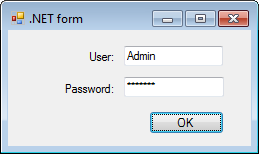
The Label component with the label1 identifier. Set the "User:" text for the Text property in the object inspector.
The Label component with the label2 identifier. Set the "Password:" text for the Text property in the object inspector.
The TextBox component with the textBox1 identifier.
The TextBox component with the textBox2 identifier. Set the * value for the PasswordChar property in the object inspector.
The button with the button1 identifier. Set the OK text for the Text property in the object inspector.
The documentPrinterNet non-visual component with the documentPrinterNet1 identifier.
Create the Test public class in the Program unit of the .NET assembly:
Public Class Test
Public Function getMB(name: string; depart: string; Login: string; Password: string; ): IMetabase;
Var
mb: IMetabase;
factory: MetabaseManagerFactoryClass;
manager: IMetabaseManager;
def: IMetabaseDefinition;
defs: IMetabaseDefinitions;
package: StandardSecurityPackage;
creds: ICredentials;
pcreds: IPasswordCredentials;
ld: ISecurityPackageLogonData;
Begin
// Create an object to work with repository description
factory := New MetabaseManagerFactoryClass.Create();
manager := factory.Active;
// Create a standard security package
package := New StandardSecurityPackage.Create();
// Get collection of repository descriptions
defs := manager.Definitions;
// Add a new description of repository connection
def := defs.Add();
// Set repository connection parameters
def.Name := "Test_connect";
def.SecurityPackage := package.Id;
def.Authentication := AuthenticationMode.amPassword;
def.DeferredLoading := False;
def.DriverId := "MSSQL2008";
ld := def.LogonData;
ld.ParamValue["SERVER"] := "ms2008a";
ld.ParamValue["DATABASE"] := "pprepository";
// Create credentials with specified authentication type
creds := package.CreateCredentials(AuthenticationMode.amPassword);
// Set login and password to log in to repository
pcreds := creds As IPasswordCredentials;
pcreds.UserName := Login;
pcreds.Password := Password;
// Determine user name that will be displayed in stamp
creds.PersonName := name;
// Determine department that will be displayed in stamp
creds.PersonDepartment := depart;
// Repository connection according to specified parameters
mb := def.Open(creds, ApplicationMode.amWin, LocaleCodeID.lcidRussian);
Return mb;
End Function getMB;
End Class Test;
Create a handler for the button:
Private Sub button1_Click(sender: System.Object; e: System.EventArgs);
Var
MB, MB_new: IMetabase;
Obj: Test = New Test();
User, Department, Login, Password: String;
rep: IPrxReport;
doc: IGxDocument;
Lic: Object;
Security: IMetabaseSecurity;
Begin
MB := Self.Metabase;
Lic := MB.RequestLicense(UiLicenseFeatureType.lftAdm);
Security := MB.Security;
// Set the marking stamp use regardless of the settings
Security.Policy.AlwaysPrintDocumentLabel := True;
// Apply specified policy settings
Security.Apply();
// Determine user name for marking stamp
User := "Ivanov Ivan Petrovitch";
// Determine department for marking stamp
Department := "HR department";
// Login
Login := textBox1.Text;
// Password
Password := textBox2.Text;
// Call the getMB method of the Test custom class
MB_new := Obj.getMB(User, Department, Login, Password) As IMetabase;
// Get report, for which marking stamp is applied
Rep := MB_new.ItemById["REPORT"].Open(Null) As IPrxReport;
doc := rep As IGxDocument;
// Open document for preview before print to see marking stamp
documentPrinterNet1.Document := doc;
documentPrinterNet1.DocumentPrinterUi.PrintPreview(0, New IWin32WindowForeAdapter(Self), True);
Lic := Null;
End Sub;
Start form for execution, enter user credentials to connect to repository and click the OK button.
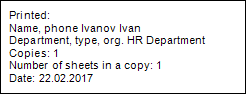
As a result, the report is opened for view, the marking stamp with filled values for the &[DEPARTMENT] and &[NAME] substitutions is displayed at the bottom of the page:
See also:
Examples | IMetabaseLinkBase | Marking Stamp