Click the  Calculate Algorithm button in the Start Calculation group on the Calculation ribbon tab.
Press F5.
To calculate an algorithm:
Set calculation dates and parameter values on the parameters panel.
Set up calculation execution using the Set Up Calculation Execution dialog box.
If in different blocks different selection of the same source is used, select the Load Data Separately from the Rest checkbox in the context menu of the blocks in calculation tree. In this case, separate data loading is more quickly and decrease the total algorithm calculation time.The checkbox is available for all block types.
After executing the operations, algorithm is calculated and the dialog box displays results. If an error occurred on calculation, the corresponding message is displayed.
To calculate the entire algorithm:
Click the Calculate Algorithm button in the Start Calculation group on the Calculation ribbon tab.
Press F5.
Algorithm calculation is started. To stop algorithm calculation, click the  Stop button in the Start Calculation group on the Calculation ribbon tab.
TIP. If you want to deny algorithm calculation stop, see the How to Deny Calculation Algorithm Stop? section.
During calculation, all algorithm objects can be read. For example, the user can check calculation block settings or open block calculation results in the Analytical Queries (OLAP) tool.
After the calculation is completed, the dialog box containing results opens. For example:
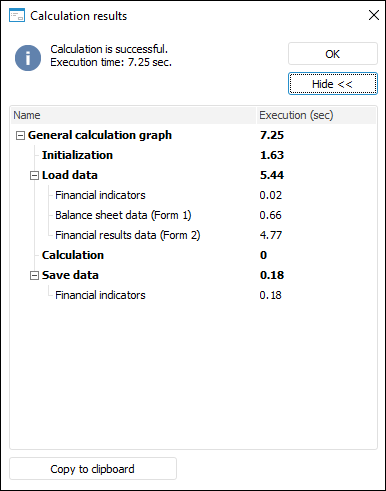
If an error occurred on calculation, the corresponding message is displayed.
To calculate only selected blocks:
Select the blocks to be calculated in the working area or calculation tree.
To select several blocks in the working area, use the SHIFT key, in the calculation tree - the CTRL or SHIFT key.
Click the  Calculate Selected button in the Start Calculation group on the Calculation ribbon tab.
After the calculation is completed, the dialog box containing results opens. If an error occurred on calculation, the corresponding message is displayed.
See also:
Working with Ready Calculation Algorithm