getVScrollBarContainer();
The getVScrollBarContainer method returns vertical scrollbar container.
The method returns DOM element.
To execute the example, the HTML page must contain the DataGrid component named grid (see Example of Creating the DataGrid Component). Change table height and add a handler for vertical scrollbar position change event. Add a handler for scrollbars position change event:
// Change table height
grid.setHeight(220);
// Add a handler for vertical scrollbar position change event
grid.VerticalScrollChanged.add(function(sender, args) {
    console.log("Vertical scrollbar position is changed");
});
// Add a handler for scrollbars position change event
grid.ScrollChanged.add(function(sender, args) {
    console.log("Scrollbars position is changed");
});
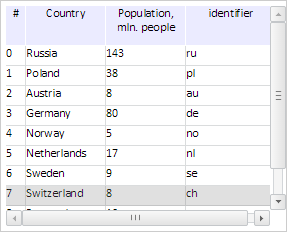
After height change a vertical scrollbar appears:
Get identifier and size of vertical scrollbar:
// Get identifier of vertical scrollbar
console.log("Identifier of vertical scrollbar: " + grid.getVScrollBarId());
// Get width of vertical scrollbar
console.log("Width of vertical scrollbar: " + grid.getVScrollbarWidth());
// Get height of vertical scrollbar
console.log("Height of vertical scrollbar: " + grid.getVScrollBarContainer().style.height);
The console displays identifier and size of the vertical scrollbar:
Identifier of vertical scrollbar: DataGrid86_v_scrollbar
Width of vertical scrollbar: 16
Height of vertical scrollbar: 204px
Change position of the vertical scrollbar:
// Scroll vertical scrollbar
grid.getVScrollBar().scrollTo(20, True);
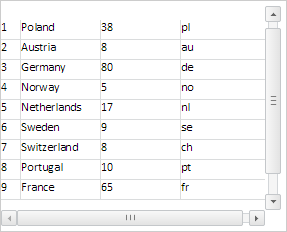
As a result, the vertical scrollbar changed its position:
The console displays messages about scrollbars and vertical scrollbar change events:
Vertical scrollbar position is changed
Scrollbar positions are changed
See also: