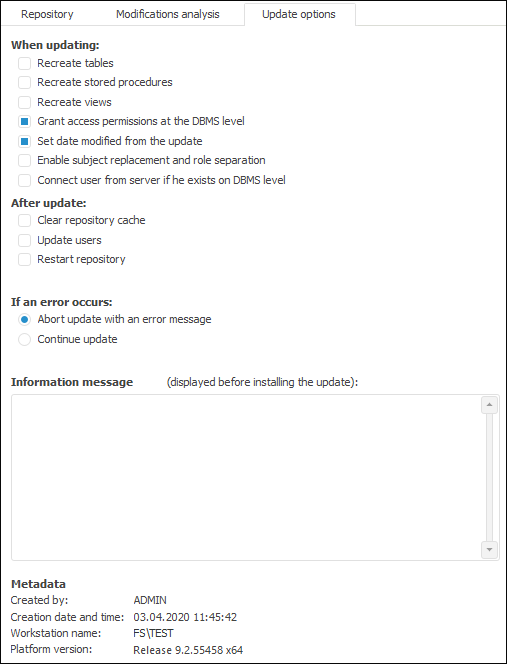
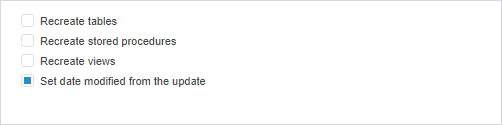
The update being edited is set up in update manager:
In the desktop application on the Update Options tab.
In the web application on the Update Options panel.
Values of options are saved for the current user and are applied automatically when a new update is created.


Determine options for edited update:
The When Updating group is used to determine the actions that will be executed on installing update:
Recreate Tables. When the checkbox is selected, tables are recreated at the DBMS level. When the checkbox is deselected, tables are not recreated.
Recreate Stored Procedures. When the checkbox is selected, procedures are recreated at the DBMS level. When the checkbox is deselected, procedures are not recreated.
Recreate Views. When the checkbox is selected, views are recreated at the DBMS level. When the checkbox is deselected, views are not recreated.
NOTE. The unique settings to recreate the specific update object can by specified by using the Recreate On Update item in the object update options.
Grant Access Permissions at the DBMS Level. If the access permission transfer for one or several objects has been set up for the update, it may require to update access permissions at the DBMS level. Selecting the checkbox allows for informing the user about installing update and when the positive answer is selected, to update access permissions are on the DBMS level. If the checkbox is deselected on installing update, permissions are applied only at the platform level; to apply access permissions at the DBMS level, update users.
NOTE. The operation is available only in the desktop application.
Set Date Modified from the Update. The checkbox is deselected by default, and after update is executed the date of modification for the objects contained in this update corresponds to the date of executing the update. Selecting the checkbox enables the user to set the modification date of the updated object after update as a real date of the object modification, that is, the date stored in the update.
NOTE. It is recommended to avoid selecting the Set Date Modified from the Update checkbox on updating development environment objects if local drive caching. If after updating, comparing of versions shows that cached object is newer than that in the update, the object will not be recompiled, and its older version will be used.
Enable Subject Replacement and Role Separation. The checkbox is selected by default. This checkbox determines the behavior when it is required to replace subjects and separate roles on creating an update. The parameter is saved in the update file.
NOTE. The operation is available only in the desktop application.
Connect User from Server if He Exists on DBMS Level. Select the checkbox if the update contains:
Process. The operation is required to save the owner role that was set up in steps of the Data Entry and Approval business process.
Security Subject. The operation is required on transfer of single users between repositories. Select the checkbox for correct transfer of users to database server. In this case, when the update is installed, a new user is not created if he already exists on the server. If the checkbox is not installed, a new user is created on the server. If this user already exists, the corresponding error message is displayed.
NOTE. The operation is available only in the desktop application.
The After Update group is used to determine the actions that will be executed after update installation: The list of selected actions is displayed on the last page of the update setup wizard:
Clear Repository Cache. It clears repository and assemblies cache of Foresight. Analytics Platform, which are stored on the hard drive (if the Cache Assemblies on Local Drive Only checkbox is selected) and on the server (if the Cache Assemblies on Local Drive Only checkbox is deselected.
Update Users. This operation is required when it is not available to use permissions transfer due to the differences in user lists of the destination schema and source schema (or differences in permissions) because permissions will be transferred from the schema where the update file is created.
Restart Repository. This operation is required if updated objects had been opened when an update started. Executing the operation closes all repository objects, and a dialog box for repository connection automatically opens.
The If an Error Occurs group is used to determine the action if update error occurs:
Abort Update with an Error Message. If an error occurs during the update, an error message is displayed and the update is aborted. This option is set by default.
Continue Update. If an error occurs, the update continues, and no message is displayed. Exception are errors informing that object update is impossible. In this case a message is still displayed. The update continues after responding to the displayed message.
The specified text is displayed in the update installation wizard.
NOTE. In the web application only some settings from the When updating group are available.
After the update file is opened, the following is determined in the Metadata group:
Created by.
Creation date and time.
Workstation name.
Platform version.
See also:
Creating an Update | Object Modifications Analysis
When updating