Operating system requirements: iOS 5.0 or later.
Mobile device: iPad.
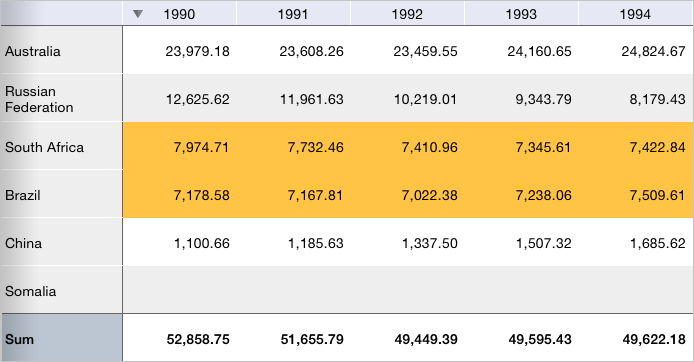
This example describes conditional formatting setup for the whole table based on the rule "Value between A and B".
Executing the example requires to place the following code in the body of the executeExample method of the ViewController class (see the Displaying of Express Report section):
MAExpressAnalysisReportViewController *contr = (MAExpressAnalysisReportViewController *)m_controller;
// Get array of data view controllers
NSArray *controllers =[contr dataViewControllers];
// Initialize rule-based conditional formatting settings
MAConditionalFormattingRules *rules = [[MAConditionalFormattingRules new] autorelease];
// Declare helper for working with conditional formatting settings
MAConditionalFormattingHelper *formattingHelper = nil;
// Determine values of A and B
double valueA = 7000;
double valueB = 8000;
// Parse data view controllers in cycle
for(NSObject *controller in controllers)
{
    // Check if the current controller is a table data view controller
    if([controller isMemberOfClass:[MAGridDataViewController class]])
    {
        // Get table data view controller object
        MAGridDataViewController *gridController = (MAGridDataViewController *)controller;
        // Get controller view
        UIView *view = [gridController view];
        // Get array of subviews
        NSArray *subviews = [view subviews];
        // Parse subviews in cycle
        for(NSObject *subview in subviews)
        {
            // Check if the current view is a table view
            if([subview isMemberOfClass:[NuGridView class]])
            {
                // Get table view object
                NuGridView *gridView = (NuGridView *)subview;
                // Get table delegate
                MAGridDelegate *delegate = (MAGridDelegate*)[gridView gridDelegate];
                // Get proxy data source
                MAGridProxyDataSource *proxyDatasource = (MAGridProxyDataSource*)[delegate proxyDataSource];

                // Create a conditional formatting rule
                MAConditionalFormattingRule *formattingRule = [[MAConditionalFormattingRule new] autorelease];
                [formattingRule setValueA: valueA];
                [formattingRule setValueB: valueB];
                // |Set fill color for cells that satisfy the rule
                [formattingRule setColor: [UIColor colorWithRed:1 green:0.77 blue:0.27 alpha:1]];
                // Use absolute numeric values
                [formattingRule setValueFormat: kCFRVFNumber];
                // Use the rule "value between A and B"
                [formattingRule setType: kCFRTBetween];
                // Mark created rule as active
                [formattingRule setActive: YES];

                // Get the rule "Value between A and B"
                MAConditionalFormattingRule *betweenRule = [rules ruleByType: kCFRTBetween];
                // Merge rules
                [betweenRule merge: formattingRule];

                // Create a basic helper for working with conditional formatting settings
                formattingHelper = [[MAConditionalFormattingHelper alloc] initWithProxyDataSource: proxyDatasource];
                // Apply conditional formatting settings to the whole table
                [formattingHelper applyGlobalConditionalFormat: rules];
            }
        }
    }
}
After executing the example the conditional formatting with the use of the rule "Cells between A and B" is applied to the express report whole table. All the cells containing values from 7000 to 8000 are filled with yellow color:
Deactivate the applied rule. To do this, add the following script to the example:
// Disable all the rules
[rules turnAllInactive];
// Apply new conditional formatting settings
[formattingHelper applyGlobalConditionalFormat: rules];
After executing the example the express report table is restored to its initial view.
See also: