Operating system requirements: iOS 5.0 or later.
Mobile device: iPad.
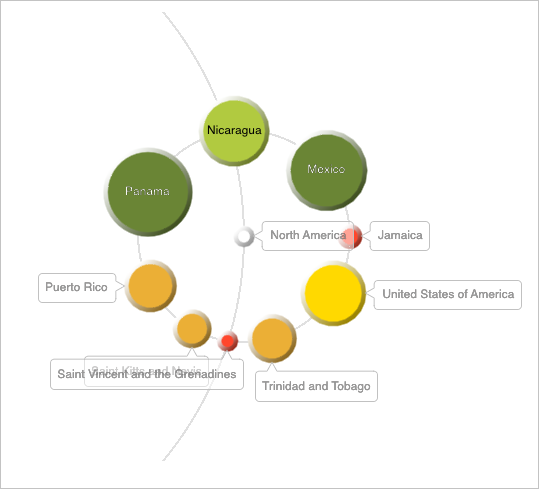
This example describes some methods of working with a bubble tree data view. After starting the example the following operations are executed:
A bubble tree data view controller is created.
Bubble tree size and color legends are hidden.
A path to folder with the express report is determined, which data is used to create a bubble tree.
Executing the example requires to place the following code instead of the executeExample method of the ViewController class (see the Displaying of Express Report section):
-(void)executeExample {
    // Remove all window subviews
    NSArray *subviews = [self.view subviews];
    for(UIView *subView in subviews) {
        [subView removeFromSuperview];
    }
    // Get mobile device window size
    CGRect windowFrame = [[self view] frame];

    // Create a bubble tree controller
    MABubbleTreeDataViewController *bubbleTreeController = [self createBubbleTreeDataViewController];
    // Set bubble tree size
    UIView *bubbleTreeView = [bubbleTreeController view];
    [bubbleTreeView setFrame: windowFrame];
    // Display bubble tree
    [self.view addSubview: [bubbleTreeController view]];
}
-(MABubbleTreeDataViewController *)createBubbleTreeDataViewController {
    // Get express report controller
    MAExpressAnalysisReportViewController *contr = (MAExpressAnalysisReportViewController *)m_controller;
    // Get express report delegate
    EAReportDelegateImpl *delegate = [contr delegate];

    // Create a bubble tree data source
    SPPLPivot bubbleTreePivot = PPLPivot::pivot(m_olapReport);
    SPPLPivotTable bubbleTreePivotTable = PPLPivotTable::pivotTable(bubbleTreePivot);
    BubbleTreeDataViewDataSource *bubbleTreeDatasource = [[BubbleTreeDataViewDataSource alloc] initWithPivotTable:bubbleTreePivotTable];

    // Create a bubble tree controller
    MABubbleTreeDataViewController *bubbleTreeController = [[MABubbleTreeDataViewController alloc] initWithDataSource: bubbleTreeDatasource];
    [bubbleTreeController setDelegate: contr];
    [bubbleTreeController setTag: kViewModeBubbleTree];
    [bubbleTreeController setIsDataViewTitleVisible: YES];

    SNString plistPath = PPLFileManager::getReportPlistPath(m_olapReport->descriptor());
    NSString* correctPath = plistPath?plistPath->nsString():NULL;
    if (correctPath) {
        correctPath = [correctPath stringByDeletingLastPathComponent];
        [bubbleTreeController setPathToDirReport:correctPath];
        NSLog(@"Path to report folder: %@", correctPath);
    }
    // Get report settings
    SNDictionary sett = m_olapReport->settings();
    SNDictionary treeMapSett = NULL; // Bubble tree settings
    SNDictionary selectDict = m_olapReport->selectionDictionary();
    if (sett) {
        SNID treeMap = sett->objectForKey(NStr("treemap"));
        // Get bubble tree settings
        treeMapSett = (treeMap?treeMap->qClass<NDictionary>():NULL);
        if (treeMapSett) {
            // Load and apply bubble tree settings
            [bubbleTreeDatasource loadSettings:treeMapSett withSelection:selectDict];
            [bubbleTreeController setXmlNameSettingFromDic:(NSDictionary *)treeMapSett->nsObject()];
            } else {
            // Determine tree settings
            [bubbleTreeController setXmlNameSetting];
        }
    }
    // Hide size legend
    [bubbleTreeController setIsSetSizeIndicator: NO];
    [bubbleTreeController setIsSizeIndicator: [bubbleTreeController isSetSizeIndicator]];
    // Hide color legend
    [bubbleTreeController setIsSetColorIndicator: NO];
    MADataViewType oldMode = kViewModeTable;
    MADataViewType newMode = (MADataViewType)[bubbleTreeController tag];
    // Synchronize dimensions between old and new data views
    bool isNeedRefresh = [self syncDimensionsOldMode:oldMode newMode:newMode];
    if (isNeedRefresh) {
        // Update tree data
        [delegate controllerViewDidLoaded];
    }
    return bubbleTreeController;
}
// Synchronizes dimensins between old and new data views
- (BOOL)syncDimensionsOldMode:(MADataViewType)oldMode newMode:(MADataViewType)newMode
{
    bool result = NO;
    if (oldMode == newMode) {
        return NO;
        } else {
        result = YES;
    };
    DataViewDatasource *src = [self datasourceByViewType: oldMode];
    DataViewDatasource *dst = [self datasourceByViewType: newMode];
    if ([src conformsToProtocol:@protocol(DataViewDatasourceSyncSelection)] && [dst conformsToProtocol:@protocol(DataViewDatasourceSyncSelection)]) {
        id <DataViewDatasourceSyncSelection> source = (id<DataViewDatasourceSyncSelection>)src;
        id <DataViewDatasourceSyncSelection> dest = (id<DataViewDatasourceSyncSelection>)dst;
        DataViewDatasourceDimensionsInfo info;
        [source copyDatasourceDimensionsInfo:&info];
        result = [dest applyDatasourceDimensionsInfo:&info];
    }
    return result;
}
- (DataViewDatasource *)datasourceByViewType:(MADataViewType)type {
    // Get express report controller
    MAExpressAnalysisReportViewController *contr = (MAExpressAnalysisReportViewController *)m_controller;
    // Get express report delegate
    EAReportDelegateImpl *delegate = [contr delegate];
    switch (type) {
        case kViewModeTable: return delegate.gridDatasource;
        case kViewModeChart: return delegate.chartDatasource;
        case kViewModeMap: return [delegate mapDatasource];
        case kViewModeBubble: return [delegate bubbleDatasource];
        case kViewModeBubbleTree: return [delegate bubbleTreeDatasource];
        case kViewModeTreeMap: return [delegate treeMapDatasource];
        default: return nil;
    }
}
After executing the example the bubble tree data view is displayed: Color and size legends are hidden:
The development environment console displays the path to the express report folder, which data is used to create the bubble tree:
Report folder path: /Users/sea/Library/Application Support/iPhone Simulator/7.1/Applications/AC4804D8-C173-4008-B14D-4A2401B0B49D/Documents/repositories/910419CE79EA52E95F2F8FE76E7C24DE/OBJ21110
See also: