Operating system requirements: iOS 5.0 or later.
Mobile device: iPad.
This example enables hiding of chart elements, which area exceeds the specified value.
Executing the example requires to place the following code instead of the viewDidAppear: method of the ViewController class (see the Creating a Map with a Timeline section):
 (void)viewDidAppear:(BOOL)animated {
    [super viewDidAppear: animated];
    [self mapChartDidAppear: m_view];
    [self runExample];
}
-(void)runExample {
    // Enable hiding of map elements, which area exceeds the allowed value
    [m_view setOptimizedOut: YES];
    /* Set minimum relation of map element area
    to map plot area,
    at which these elements should be hidden */
    [m_view setOptimizeFactor: 0.03];
    // Refresh map
    [self refreshMap];
}
// Refreshes map
-(void)refreshMap {
    [[m_view timeAxis] setNeedsLayout];
    if ([m_view optimizedOut]) {
        MapLegend *legend = [m_view legend];
        [legend setVisibility: [self checkOnVisibility: CGSizeMake(legend.width, legend.height)]];

        MapLabel *caption = [m_view caption];
        [caption setVisibility: [self checkOnVisibility: CGSizeMake(caption.maxWidth, caption.font.lineHeight)]];

        MapTimeAxis *timeAxis = [m_view timeAxis];
        [timeAxis setVisible: [self checkOnVisibility: timeAxis.frame.size]];
    }
}
// Checks if it is required to display specified element with specified size
-(BOOL) checkOnVisibility: (CGSize) size {
    float mapSquare = m_view.frame.size.width * m_view.frame.size.height;
    float objectSquare = size.width * size.height;
    NSLog(@"Coefficient of occupied space: %f", (float)(objectSquare / mapSquare));
    return ((float)(objectSquare / mapSquare) <= [m_view optimizeFactor]);
}
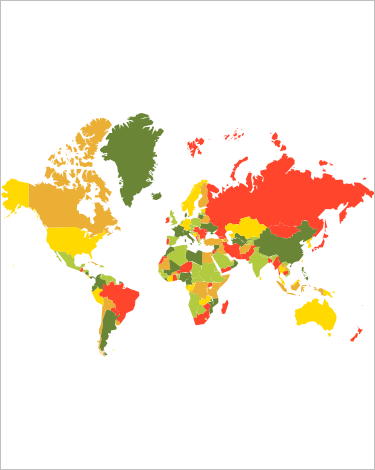
After executing the example the map title, legend and timeline are hidden:
The development environment console displays coefficients of the space occupied with map elements relative to the whole map:
Coefficient of occupied space: 0.091186
Coefficient of occupied space: 0.036551
Coefficient of occupied space: 0.348596
See also: