To execute this example, add links to the following JS and CSS files in the HEAD tag:
PP.js.
PP.Metabase.js.
PP.css
PP.Metabase.css.
Resources file (for example, resources.ru.js).
In the SCRIPT tag add the following code:
    var translateDialog,
        //Language codes displayed in the dialog
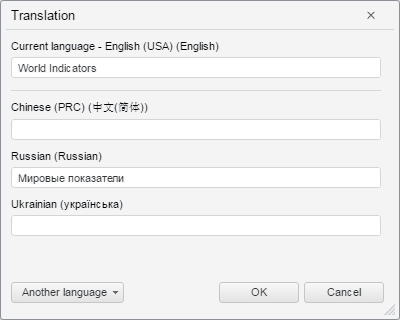
        displayLanguages = [1033, 2052, 1049, 1058],
        //Language codes displayed in the Another Language drop-down menu
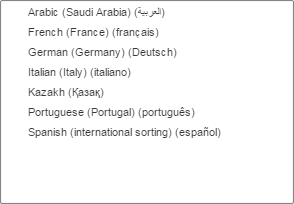
        additionalLanguages = [1033, 1025, 3082, 1040, 1087, 2052, 1031, 2070, 1049, 1058, 1036],
        //Text in edit boxes for Russian and English
        translations = { 1033: "World Indicators", 1049: "World indicators" };
    function onLoad() {
        //Resources folder
        PP.resourceManager.setRootResourcesFolder("../resources/");
        //Current interface language
        PP.setCurrentCulture(PP.Cultures.ru);
        //Create a new Translation dialog box
        translateDialog = new PP.Mb.Ui.TranslateDialog({
            ImagePath: "../build/img/",
            //Text in entry boxes
            Translations: translations,
            Mode: PP.Mb.TranslateMode.Languages,
            //Array of languages displayed in the dialog
            DisplayLanguages: displayLanguages,
            //Display the More button
            ShowLanguagesButton: True,
            //Array of languages displayed in the Another Language drop-down menu
            AdditionalLanguages: additionalLanguages,
            //Processing the event of clicking the OK button
            OkButtonClicked: function (sender, args) {
                alert(JSON.stringify(args.DialogResult.Translations));
            }
        });
        //Open the dialog
        translateDialog.show();
    }
Add a method for calling the onLoad function in the BODY tag:
<body onload="onLoad();"><body>
After executing the example the Translation dialog box opens on the HTML page:
Clicking the Another Language button opens a list of languages, which codes are set in the AdditionalLanguages property:
See also: