RowDblClick: function(sender, args);
sender. Event source.
args. Information on the event. Arguments: colIndex - column index, coordX - X coordinate of clicking; coordY - Y coordinate of clicking; el - Row DOM node; realRowIndex - row position index; rowIndex - table row index.
The RowDblClick event occurs after the double click on the table row.
To execute the example, the HTML page must contain the DataGrid component named grid (see Example of Creating the DataGrid Component). Add a handler for table row double click event:
// Set a handler for row double click event
grid.RowDblClick.add(function(sender, args){
    console.log("Table row is double clicked");
});
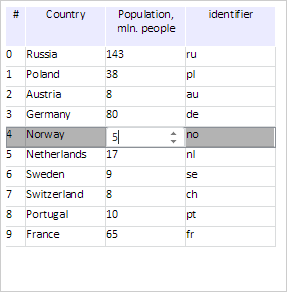
Double click the Country column cell of the row with the 4 index. As a result, editor is activated in the cell:
The console displays a message about double click on the row:
Table row is double clicked
Change cell value:
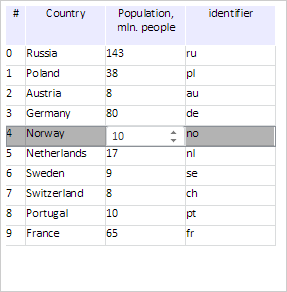
Get values of the row with the 4 index:
// Find a series with the 4 index and get row values
var row = grid.findRowByIndex(4);
PP.Object.defineProps(PP.Ui.DGRow, "Cells");
var str = "";
for (var i in row.getCells()) {
    str += row.getCells()[i].CellData["@V"] + " ";
}
console.log("Row value: " + str);
As a result the console displays row values:
Row values: 4 Norway 10 no
See also: