To execute the example, create an HTML page and execute the following operations:
1. Add links to the following files: PP.css, PP.Express.css.
Also add links to the following JS files: PP.js, PP.Metabase.js, PP.Express.js and resources.ru.js.
2. In the <head> tag specify style for the elements:
<style type="text/css">
    body, html {
        height: 100%;
        width: 100%;
        overflow: hidden;
    }
</style>
3. Then in the <head> tag add a script that creates a button to select data view layout mode:
<script type="text/javascript">
var metabase, eaxAnalyzer, eaxMbService, modeSelector;
function Ready() {
    // Determine language settings for resources
    PP.setCurrentCulture(PP.Cultures.ru)
    // Specify path to the root folder with resources files
    PP.resourceManager.setRootResourcesFolder("../resources/");
    // Create a repository connection
    metabase = new PP.Mb.Metabase({
        ExportUrl: "PPService.axd?action=export",
        ImportUrl: "PPService.axd?action=import",
        PPServiceUrl: "PPService.axd?action=proxy",
        Id: "prognozplatform7",
        UserCreds: { UserName: "user", Password: "password" }
    });
    // Open repository connection
    metabase.open();
    // Create a service used to work with express reports
    eaxMbService = new PP.Exp.EaxMdService({ Metabase: metabase });
    // Open express report with the 108 key
    eaxAnalyzer = eaxMbService.editDocument(108);
    // Specify path to the icons folder
    var IMAGE_PATH = "../Debug/img/";
    // Create the Layout button for selecting data view display mode
    modeSelector = new PP.Exp.Ui.EaxModeSelectorView({
        Source: eaxAnalyzer,
        ImagePath: IMAGE_PATH
    });
    // Add the button to document
    modeSelector.addToNode(document.body);
}
</script>
4. In the <body> tag as the value of the onLoad attribute specify name of the function that creates a button to select data view layout mode:
<body onselectstart="return false" onload="Ready()">
</body>
5. At the end of the document insert a code that sets styles corresponding to client's operating system, to the document.body node:
<script type="text/javascript">
    PP.initOS(document.body);
</script>
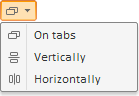
After executing the example a button to select mode of data view display is placed on the HTML page:
See also: