
To work with file encryption, create the HHFWFilesEncrypted application, which uses framework methods:
| Method name | Brief description |
| initWithCredentials (_: host: environment: project: device:) | The method initializes the framework. |
| auth (_: password:) | The method authenticates the user by login and password. |
| getFile (_: fromServerPath: mountName: password: handler:) | The method downloads file from mobile platform server. |
| putFile (_: toServerPath: mountName: password: handler:) | The method uploads file to mobile platform server. |
| decryptFileToString(_: withPassword:) | The method decrypts the file to a string. |
| decryptFile(_: toFile: withPassword:) | The method decrypts the file to a new file. |
| decryptFileToData(_: withPassword:) | The method decrypts the file to clipboard. |
The HHFWFilesEncrypted application includes one screen, the UITextField text box, the UITextView text view, and UIButton buttons:
Get file. Get file.
Put file. Send file.
Decrypt to string. Decrypt file to a string.
Decrypt to file. Decrypt file to a new file.
Decrypt to data. Decrypt file to clipboard.
NOTE. When the application is initialized, authentication is executed, buttons and text boxes are not available. If the authentication is executed successfully, buttons and text boxes are available, and the text box displays the text "Authentication success".
To execute the example:
Enter the "file.txt" file name and the "password" encryption key to the text boxes and click the Get File button.
As a result, the specified file encrypted with the specified key is obtained from mobile platform server:
The "file.txt" file is written to the Documents folder in the mobile platform directory:

File contents is encrypted:

In the Documents folder create a copy of the "file.txt" file and rename it to file1.txt:
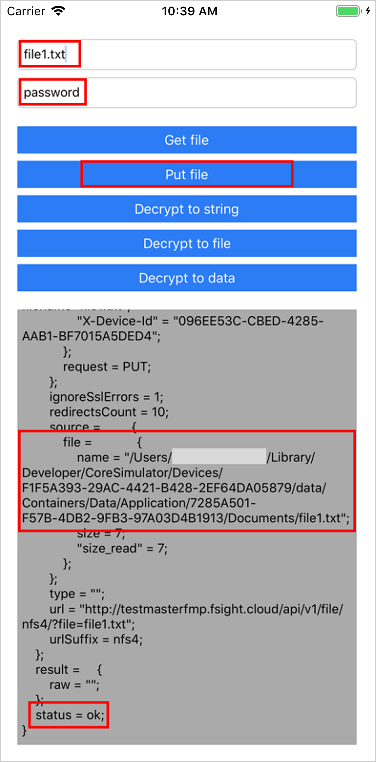
Enter the "file1.txt" file name and the "password" encryption key to the text boxes and click the Put File button.
As a result, the specified file is sent to mobile platform server:
Enter the "file.txt" file name and the "password" encryption key to the text boxes and click the Decrypt to String button.
The text view displays the result of file decryption to a string:

Enter the "file1.txt" file name and the "password" encryption key to the text boxes and click the Decrypt to File button.
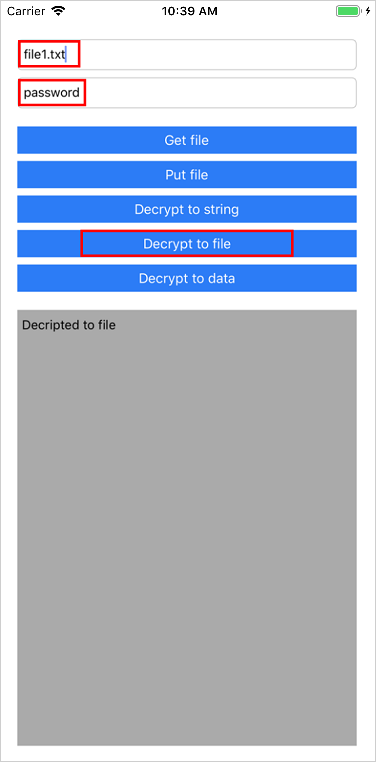
The decriptedFile.txt file appears in the Documents folder in the mobile application directory:
Contents of the decriptedFile.txt file corresponds to the encrypted contents of the file1.txt file:

Enter the "file1.txt" file name and the "password" encryption key to the text boxes and click the Decrypt to Data button.
The text view displays the result of file decryption as clipboard contents:

Application code:
import UIKit

class ViewController: UIViewController {

    // Declare variables for user interface elements
    @IBOutlet weak var fileNameTextField: UITextField!
    @IBOutlet weak var passwordTextField: UITextField!
    @IBOutlet weak var resultTextView: UITextView!
    @IBOutlet weak var getFileButton: UIButton!
    @IBOutlet weak var putFileButton: UIButton!
    @IBOutlet weak var decryptToStringButton: UIButton!
    @IBOutlet weak var decryptToFileButton: UIButton!
    @IBOutlet weak var decryptToDataButton: UIButton!

    // Redetermine view life cycle methods
    override func viewDidLoad() {
        super.viewDidLoad()
        self.deactivateButtons()
        self.initializeFramework()
        self.auth {
            self.activateButtons()
            self.resultTextView.text = "Authentication success"
        }
    }

    // Determine methods for handling events initialized by the user in the user interface
    @IBAction func viewTapped(_ sender: UITapGestureRecognizer) {
        self.fileNameTextField.resignFirstResponder()
    }
    @IBAction func getFilePressed(_ sender: UIButton) {
        self.getFile { (jsonResult) in
            self.resultTextView.text = String(format: "%@", jsonResult)
        }
    }
    @IBAction func putFilePressed(_ sender: UIButton) {
        self.putFile { (jsonResult) in
            self.resultTextView.text = String(format: "%@", jsonResult)
        }
    }
    @IBAction func decryptToStringPressed(_ sender: UIButton) {
        self.decryptFileToString { (string) in
            self.resultTextView.text = String(format: "%@", string)
        }
    }
    @IBAction func decryptToFilePressed(_ sender: UIButton) {
        self.decryptFileToFile {
            self.resultTextView.text = String(format: "%@", "Decripted to file")
        }
    }
    @IBAction func decryptToDataPressed(_ sender: UIButton) {
        self.decryptFileToData { data in
            self.resultTextView.text = String(format: "%@", data as NSData)
        }
    }

    // Determine framework initialization method
    private func initializeFramework() {
        let apiVersion: String = "v1"
        let host: String = "http://testmasterfmp.fsight.cloud/"
        let environment: String = "viktoriia_test"
        let project: String = "project"
        let device: String = (UIDevice.current.identifierForVendor?.uuidString)!
        HHFWController.sharedInstance().initWithCredentials(
            apiVersion,
            host: host,
            environment: environment,
            project: project,
            device: device
        )
    }

    // Determine authentication method
    private func auth(completion: @escaping ()->()) {
        let username: String = "test"
        let password: String = "test123"
        HHFWController.sharedInstance().auth(username, password: password){ (jsonResult) in
            if let jsonDict = jsonResult as? NSDictionary,
                let status = jsonDict["status"] as? String, status == "ok" {
                print("Auth success")
                completion()
            } else {
                print("Auth error")
            }
        }
    }

    // Determine file getting method
    private func getFile(completion: @escaping (NSDictionary)->()) {
        guard let fileName: String = self.fileNameTextField.text else { return }
        guard let password: String = self.passwordTextField.text else { return }
        let mountName: String = "nfs4"
        HHFWController.sharedInstance().getFile(fileName, fromServerPath: fileName, mountName: mountName, password: password) { (jsonResult) in
            if let jsonDict = jsonResult as? NSDictionary,
                let status = jsonDict["status"] as? String, status == "ok" {
                print("Get file success")
                completion(jsonDict)
            } else {
                print("Get file error")
            }
        }
    }

    // Determine sending file method
    private func putFile(completion: @escaping (NSDictionary)->()) {
        guard let fileName: String = self.fileNameTextField.text else { return }
        guard let password: String = self.passwordTextField.text else { return }
        let mountName: String = "nfs4"
        HHFWController.sharedInstance().putFile(fileName, toServerPath: fileName, mountName: mountName, password: password) { (jsonResult) in
            if let jsonDict = jsonResult as? NSDictionary,
                let status = jsonDict["status"] as? String, status == "ok" {
                print("Put file success")
                completion(jsonDict)
            } else {
                print("Put file error")
            }
        }
    }

    // Determine method for file decryption to a string
    private func decryptFileToString(completion: @escaping (String)->()) {
        guard let fileName: String = self.fileNameTextField.text else { return }
        guard let password: String = self.passwordTextField.text else { return }
        let string = HHFWController.sharedInstance().decryptFileToString(fileName, withPassword: password) ?? ""
        completion(string)
    }

    // Determine method for file decryption to a new file
    private func decryptFileToFile(completion: @escaping ()->()) {
        guard let fileName: String = self.fileNameTextField.text else { return }
        guard let password: String = self.passwordTextField.text else { return }
        let destinationFile: String = "decriptedFile.txt"
        HHFWController.sharedInstance().decryptFile(fileName, toFile: destinationFile, withPassword: password)
        completion()
    }

    // Determine method for file decryption to clipboard
    private func decryptFileToData(completion: @escaping (Data)->()) {
        guard let fileName: String = self.fileNameTextField.text else { return }
        guard let password: String = self.passwordTextField.text else { return }
        let data = HHFWController.sharedInstance().decryptFileToData(fileName, withPassword: password)
        completion(data)
    }

    // Determine methods for changing user interface view elements
    private func deactivateButtons() {
        self.getFileButton.isEnabled = false
        self.putFileButton.isEnabled = false
        self.decryptToStringButton.isEnabled = false
        self.decryptToFileButton.isEnabled = false
        self.decryptToDataButton.isEnabled = false
    }
    private func activateButtons() {
        self.getFileButton.isEnabled = true
        self.putFileButton.isEnabled = true
        self.decryptToStringButton.isEnabled = true
        self.decryptToFileButton.isEnabled = true
        self.decryptToDataButton.isEnabled = true
    }
}
See also: