edit(rowIndex: Number, colIndex: Number);
rowIndex. Cell row index.
colIndex. Cell column index.
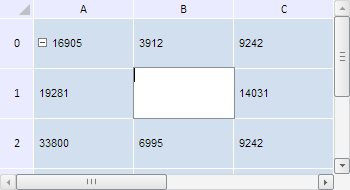
The edit method turns a cell to edit mode.
To execute the example, the HTML page must contain the TabSheet component named tabSheet (see Example of Creating the TabSheet Component). Enable editing cell range, and start editing a cell under coordinates (1, 1):
// Get an object of the TabSheetCoord type
var coord = tabSheet.coord(1, 1);
// Get a cell range by the specified coordinates
var range = tabSheet.getRange(0, 1, 1, 0);
// Set a special edit mode for table cells
tabSheet.setIsEditable(PP.Ui.TabSheetEditMode.UserEnabledCell);
// enable editing of cell range
tabSheet.setIsUserEditableRanges(range);
// Turn the cell to the edit mode
tabSheet.edit(coord);
// Get information about the current active cell editor
var isEdit = confirm("Enable cell editing (" + coord.colIndex + ", " + coord.rowIndex + ") ?");
if (isEdit) {
    var cellEditorInfo = tabSheet.getCurrentCellEditor();
    console.log("Editor is opened for cell (" + cellEditorInfo.getCoord().colIndex + ", " + cellEditorInfo.getCoord().rowIndex + ")");
} else {
    // Close the cell editor window
    tabSheet.closeCellEditor();
    // Generate the Edited event
    tabSheet.doEdit(tabSheet.getModel().getCell(coord), Null)
};
// Clear information about an array of the cells edited by the user
tabSheet.clearUserEditableRanges();
After executing the example editing of the cell under coordinates (1, 1) is started. A dialog box with a request to confirm cell editing appears. Click the OK button to continue:
The browser console shows the following message:
Editor opens for the cell (1, 1)
Clicking the Cancel button closes the cell editor.
See also: