EnableEdit: Boolean;
The EnableEdit property determines whether table cell can be edited.
Use JSON or the setEnableEdit method to set the property value, and the getEnableEdit method to get the property value.
Available Values:
true. Table cells can be edited (default).
false. Table cells cannot be edited.
To execute the example, the HTML page must contain the DataGrid named grid (see Example of Creating the DataGrid Component). Process the ControlRendered event:
grid.ControlRendered.add(function(sender, args) {
    if(args) {
        console.log("Edited cell (%s, %s)", args.rowIndex, args.colIndex);
    }
});
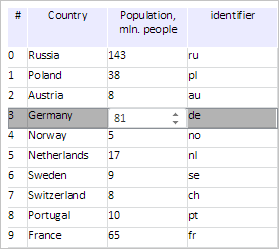
After executing the example double click the cell of the row with the number 3 and in the column named Population, mln. After this action a value editor is created in this cell:
The console browser displays a corresponding message:
The (0, popul) cell is edited
Now disable editing of table cells by executing the following script string:
grid.setEnableEdit(false);
After executing the example table cell editing is disabled.
See also: