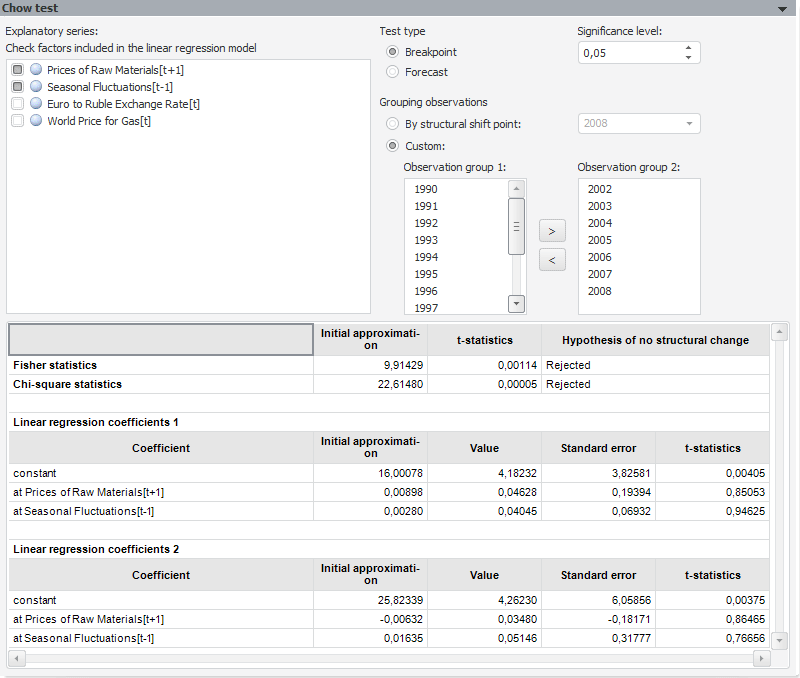
The test examines the regression homogeneity of two data samples.
Test parameters:
Explanatory Series. Factors that affect the behavior of the explained variable. By default, the list includes all factors of the tested linear regression model. The factor checkbox indicates whether the factor is included into the test. Deselect the checkbox to exclude the factor from the test. The number of explanatory series must be at least 1.
Test Type. Select the radio button depending on the ratio of the group elements:
Breakpoint. Both groups have approximately the same number of elements.
Forecast. The number of elements in one group considerably exceeds that in another group.
Significance Level. The significance level value, at which the hypothesis is rejected.
Grouping Observations. Divide tested observations into groups (observations determine the sample period). The created groups are tested for homogeneity. Select the required method of dividing observations into groups:
By Structural Shift Point. Groups are created by the structural shift point. Select the last observation to be included into the first group in the drop-down list.
Custom. To create groups, the user can click the  and
and  buttons.
The results are displayed below as a table with the following data:
Chi-Square Statistics. It is not calculated for this test.
The following data is given for each statistics: initial approximation, t-statistics value and the test result (whether the hypothesis of missing structure changes is accepted or rejected).
Linear Regression Coefficients. Regression coefficients of each group calculated for the selected factors. If the model uses autoregression and moving average, model coefficients will contain autoregression and moving average coefficients.
NOTE. If test parameters have been specified incorrectly, the result table is not displayed. Instead of a table an error message is displayed.
See also: