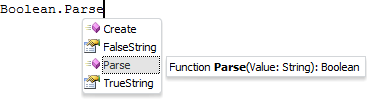
IntelliSense is a special technology that enables the user to analyze code showing certain types and type members available for use. IntelliSense is used to simplify application development by automatically creating a code in the code editor. Using IntelliSense enables the user to reduce time required to type code and avoid mistypes in the code.
A list of code elements available for use in the current position of the code is displayed as a drop-down alphabet list. Press CTRL+SPACE to open the list. Select any element in the list to see detailed information on this element. Depending on the type of the selected element, the details can include the following information:
Type of the selected element: class, interface, property, method, and so on.
List of mandatory and optional parameters.
Type of returned value or the value itself.
When a list contains a lot of elements, scrollbar is also available. After the required element is selected, it can be inserted into the code in one of the following ways:
Press the SPACE key.
Press the ENTER key.
Press CTRL+ENTER.
Press the TAB key.
Double-click the element.
The list of members can be closed at any moment by pressing the ESC key.
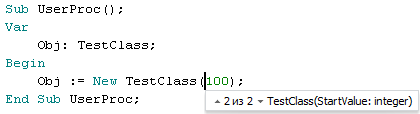
For each type member a tooltip is available that contains member syntax and the list of its mandatory and optional parameters. This tooltip is displayed automatically after typing an opening round bracket after the type member name. The parameter, which value is currently edited, is highlighted in bold. After typing closing round bracket the tooltip is hidden. Press CTRL+SHIFT+SPACE to manually open a tooltip.

When developing applications in Fore.NET you can use the Up Arrow and Down Arrow keys to view the list of alternative parameters sets for overloaded members:
See also: