Operating system requirements: iOS 5.0 or later.
Mobile device: iPad.
This example describes application of conditional formatting settings for the express report whole table and displaying of growth indicators built by rows.
Executing the example requires to place the following code in the body of the executeExample method of the ViewController class (see the Displaying of Express Report section):
MAExpressAnalysisReportViewController *contr = (MAExpressAnalysisReportViewController *)m_controller;
// Get array of data view controllers
NSArray *controllers =[contr dataViewControllers];
// Go through data view controllers
for(NSObject *controller in controllers)
{
    // Check if the current controller is used for table data view
    if([controller isMemberOfClass:[MAGridDataViewController class]])
    {
        // Get table data view object
        MAGridDataViewController *gridController = (MAGridDataViewController *)controller;
        // Get table data source
        GridDataViewDatasource *grid = [gridController gridDatasource];
        // Check if table data source is empty
        if([grid isEmpty] == NO)
        {
            // Get controller view
            UIView *view = [gridController view];
            // Get array of nested views
            NSArray *subviews = [view subviews];
            // Go through nested views in cycle
            for(NSObject *subview in subviews)
            {
                // Check if the current view is a public view
                if([subview isMemberOfClass:[NuGridView class]]) {
                    // Get table view object
                    NuGridView *gridView = (NuGridView *)subview;
                    // Get table delegate
                    MAGridDelegate *delegate = (MAGridDelegate*)[gridView gridDelegate];
                    // Get proxy data source
                    MAGridProxyDataSource *proxyDatasource = (MAGridProxyDataSource*)[delegate proxyDataSource];

                    // Determine conditional formatting settings for whole table
                    MAConditionalFormattingScale *formatting = [[MAConditionalFormattingScale new] autorelease];
                    [formatting setArea: kCFAEntireTable];
                    // Set conditional formatting type
                    [formatting setType: kCFTSpecificColors];

                    // Get value scale for row
                    ValueScale *scale = [formatting scale];
                    // Get standard color palette
                    NSArray *defaultPaletteColors = [[SettingsPaletteSelector palettes] objectAtIndex:0];
                    // Set scale value
                    [scale setScaleValues: defaultPaletteColors];
                    // Specify number of scale values
                    [scale setScaleSteps: [defaultPaletteColors count]];
                    // Specify scale type
                    [scale setScaleType: ValueScaleEqual];

                    // Get table style helper
                    MAStyleHelper *styleHelper = [proxyDatasource styleHelper];
                    // Create new table style
                    MAGridCellStyle *cellStyle = [MAGridCellStyle emptyStyle];
                    // Apply conditional formatting settings
                    [cellStyle setConditionalFormat: formatting];
                    // Build growth indicator by rows
                    [cellStyle setGrowthIndicatorType: kGITByRows];
                    // Set table style
                    [styleHelper setGlobalConditionalFormattingStyle: cellStyle];
                }
            }
        }
    }
}
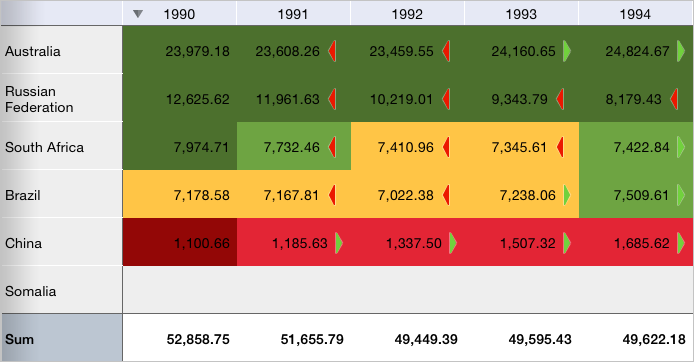
After executing the example conditional formatting is applied to the whole express report table, growth indicators buildt by rows are displayed. The palette containing yellow color and shades of green and red colors is used for cell fill. Database cells are filled with grey color:
Then use default settings style to set cell style. To do this, replace the code string:
MAGridCellStyle *cellStyle = [MAGridCellStyle emptyStyle];
with the following string:
MAGridCellStyle *cellStyle = [MAGridCellStyle defaultStyle];
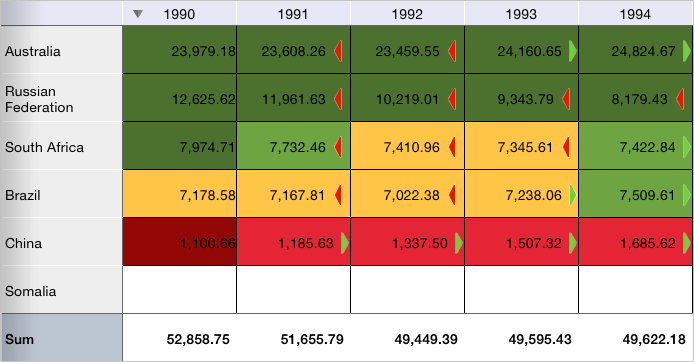
After executing the example cells without data are filled with white color. All the cells with data are outlined with black border:
Then delete conditional formatting settings and growth indicator type by adding before the string:
[styleHelper setGlobalConditionalFormattingStyle: cellStyle];
the following code fragment:
// Delete conditional formatting settings
[cellStyle removeConditionalFormat];
// Additionally:
// Delete growth indicator type
[cellStyle removeGrowthIndicatorType];
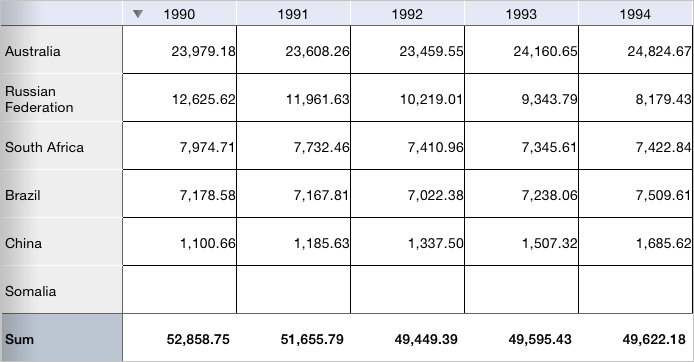
After executing the example conditional formatting settings and growth indicators in table are deleted:
See also: