Operating system requirements: iOS 5.0 or later.
Mobile device: iPad.
This example describes the use of fixed table rows and columns. After starting the example the following operations are executed:
Table row is fixed.
Table column is fixed.
Table width and height are changed.
Executing the example requires to place the following code instead of the executeExample and viewDidAppear: method of the ViewController class (see the Creating a Simple Data Grid section):
-(void) executeExample {
    // Fix row
    [proxyDatasource gridView:[contr gridView] fixRow:2];
    // Fix column
    [proxyDatasource gridView:[contr gridView] fixColumn:1];
};
- (void)viewDidAppear:(BOOL)animated {
    [super viewDidAppear:animated];
    // Set table size
    [[contr gridView] setFrame:CGRectMake(0, 0, 300, 200)];
}
// Get table size before their change
- (void)gridView:(NuGridView *)gridView beforeFrameChangeFrom:(CGRect)fromFrame toFrame:(CGRect)toFrame {
    NSLog(@"Old width: %f, height: %f", fromFrame.size.width, fromFrame.size.height);
}
// Get table size after their change
- (void)gridView:(NuGridView *)gridView afterFrameChangeFrom:(CGRect)fromFrame toFrame:(CGRect)toFrame {
    NSLog(@"New width: %f, height: %f", toFrame.size.width, toFrame.size.height);
}
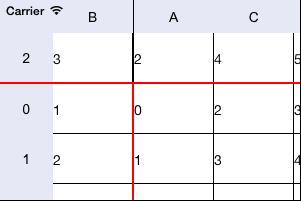
After executing the example the row with the number 2 and the column with the number 1 are fixed, table width is 300 pixels, table height is 200 pixels. On scrolling the table contents right and down, the fixed rows and columns do not change their position:
The development environment console displays table size before and after their change:
Old width: 0.000000, height: 0.000000
New width: 300.000000, height: 200.000000
See also: