Operating system requirements: iOS 5.0 or later.
Mobile device: iPad.
This example describes table menu implementation. After starting the example the following operations are executed:
Menu items are created and set.
Menu item text is aligned.
Position of popup window arrow and popup window plot area are determined.
A delegate and a table, for which it is called are set for menu.
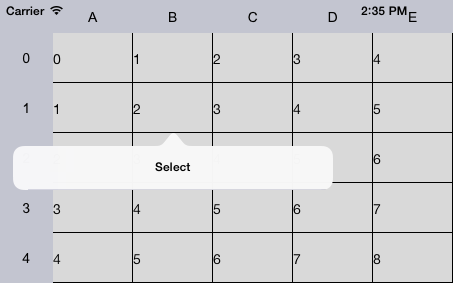
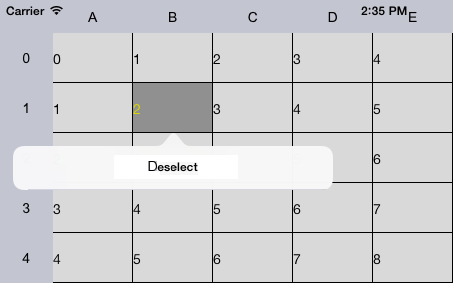
Table cell press event is handled, after which menu is displayed. If a cell is not highlighted, the Select menu item is available, if it is not highlighted, the Deselect menu item.
A single-element pool instance is created for common access to element.
Executing the example requires to add the following methods with their implementation in the ViewController class (see the Creating a Simple Data Grid section):
// Creates menu items
- (NSArray *)makeMenuItemsForCell:(NuGridCell *)cell {
    NSMutableArray *items = [[NSMutableArray new] autorelease];
    // Determine operation called after menu item selection
    SEL changeCellSelection = @selector(changeCellSelection:);
    if ([cell isHighLighted]) {
        // If a cell is not highlighted, display the Deselect menu item
        UIMenuItem *firstMenuItem = [[[UIMenuItem alloc] initWithTitle:@"Deselect" action:changeCellSelection] autorelease];
        [items addObject:firstMenuItem];
        } else {
        // If a cell is highlighted, display the Select menu item
        UIMenuItem *secondMenuItem = [[[UIMenuItem alloc] initWithTitle:@"Select" action:changeCellSelection] autorelease];
        [items addObject:secondMenuItem];
    }
    return items;
}
// Changes cell selection state
- (void)changeCellSelection:(id)sender {
    // Get last pressed cell
    NuGridCell *lastTouchedCell = [contr gridView].controller.lastTouchedCell;
    if (lastTouchedCell) {
        // Check if table cell is highlighted
        if ([lastTouchedCell isHighLighted]) {
            // Restore table cell initial background
            [lastTouchedCell setBackgroundColor:[[lastTouchedCell style] backgroundColor]];
            [lastTouchedCell setIsHighLighted:NO];
            } else {
            // Change table cell background
            [lastTouchedCell setBackgroundColor:[UIColor lightGrayColor]];
            [lastTouchedCell setIsHighLighted:YES];
        }
    }
}
Then handle table cell press event, after the event occurs the menu is displayed. Consider three methods of the handler implementation:
1. First method.
- (void)gridView:(NuGridView *)gridView wasTouchedInCell:(NuGridCell *)cell {
    // Create menu manager
    NuMenuController *menuCtrl = [NuMenuController sharedMenuController];
    // Create and set menu items
    [menuCtrl setMenuItems:[self makeMenuItemsForCell:cell]];
    // Determine menu settings
    [menuCtrl setRect:cell.frame inView:gridView forTarget:[gridView gridDelegate]];
    // Determine popup window arrow direction
    [menuCtrl setArrowDirection: UIPopoverArrowDirectionUp];
    // Align menu item text by center
    [[menuCtrl menu] setTextAlignment:UITextAlignmentCenter];
    // Display menu by using animation
    [menuCtrl setMenuVisible:YES animated:YES];
}
2. Second method.
- (void)gridView:(NuGridView *)gridView wasTouchedInCell:(NuGridCell *)cell {
    // Create menu manager
    NuMenuController *menuCtrl = [NuMenuController sharedInstance];
    // Create and set menu items
    [menuCtrl setMenuItems:[self makeMenuItemsForCell:cell]];
    // Set menu delegate
    [menuCtrl setTarget:[gridView gridDelegate]];
    // Create and set menu items
    [menuCtrl setTargetRect:[cell frame]];
    // Set table, for which menu is called
    [menuCtrl setTargetView:gridView];
    // Determine popup window arrow direction
    [menuCtrl setArrowDirection: UIPopoverArrowDirectionUp];
    // Align menu item text by center
    [[menuCtrl menu] setTextAlignment:UITextAlignmentCenter];
    // Display menu
    [menuCtrl setMenuVisible:YES];
}
3. Third method.
- (void)gridView:(NuGridView *)gridView wasTouchedInCell:(NuGridCell *)cell {
    // Display popup menu
    [self showPopoverForCell: cell];
}
// Displays popup window
- (void) showPopoverForCell:(NuGridCell*) cell {
    NuMenu *menu = [[[NuMenu alloc] init] autorelease];
    [menu setDelegate: self];
    [menu setItems:[self makeMenuItemsForCell:cell]];
    // Align menu item text by center
    [menu setTextAlignment:UITextAlignmentCenter];
    CGRect rect = [cell frame];
    popover = [[UIPopoverController alloc] initWithContentViewController:menu];
    [popover presentPopoverFromRect:rect inView:[contr gridView] permittedArrowDirections:UIPopoverArrowDirectionUp animated:YES];
    [popover setDelegate:self];
    if ([[contr gridView] respondsToSelector:@selector(setScrollEnabled:)]) {
        [(UIScrollView *)[contr gridView] setScrollEnabled:NO];
    }
}
After executing the example pressing any table cell displays a menu with the Select item:
After selecting this menu item the corresponding cell is highlighted. To clear selection, press again the cell and select the Deselect menu item.
See also: