Operating system requirements: iOS 5.0 or later.
Mobile device: iPad.
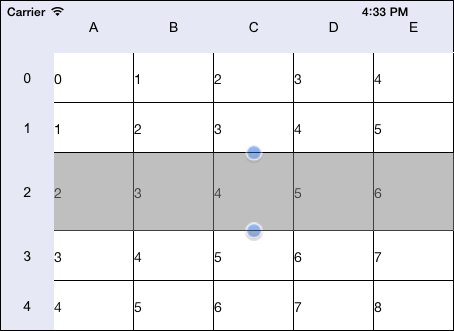
This example implements changing of selected table cell height.
Executing the example requires to place the following code instead of the executeExample method of the ViewController class (see the Creating a Simple Data Grid section):
-(void) executeExample{
    // Create an table resize element
    NuGridResizer *resizer = [NuGridResizer resizerForGridView:[contr gridView]];
    // Set parent table
    [resizer setParentGrid: [contr gridView]];
    // Resize vertical area used for resizing
    CGSize size = CGSizeMake(90, 90);
    [resizer setTopBottomSelectionTouchAreaSize:size];
    // Set resize element
    [[contr gridView] setValue:resizer forKey:@"m_resizer"];
    // Set start size of changed cell height
    rowHeight = 50;
};
 // Handle table cell press event
 - (void)gridView:(NuGridView *)gridView wasTouchedInCell:(NuGridCell *)cell {
     // Start to change cell height
     [gridView addSubview:[gridView resizer]];
     [[gridView resizer] resizeHeightForCell: cell];
 }
// Handle cell height change event
- (void)gridView:(NuGridView *)gridView heightChangeNeeded:(double)newHeight forCell:(NuGridCell *)cell
{
    // Finish cell resizing if its height exceeds 300 pixels
    if(newHeight > 300)
    {
        [[gridView resizer] finish];
    }
    // Save cell height value
    rowHeight = newHeight;
    // Stretch resize area after it was changed
    [[gridView resizer] stretchAfterChanging];
}
It is also required to place the following code instead of the heightForRow method of the ViewController class:
// Set row height
- (double) gridView:(NuGridView *)gridView heightForRow:(NSInteger)rowNumber
{
    if(rowNumber == 2)
    {
        return rowHeight;
    }
    else
    {
        return 50;
    }
}
Press any table cell, which is in the row with the number 2, after that change its height by dragging the marker.
As a result, the selected cell height is changed:
See also: