Early and Late Binding
Terms of early and late binding are used in different programming languages to describe operations on the step of compilation and on the stage of application execution. These terms are also relevant for Fore.NET language.
Early Binding
Early binding means that addressing the object and calling its method will be bound on the step of Fore.NET assembly compilation. All necessary information to determine which method will be used will be given on the compilation step. To use early binding in Fore.NET assembly:
Connect required assembly by the link in the navigator of the project:
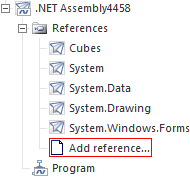
In the code of unit/form of the developed .NET assembly write Imports directive to import types of the connected assembly. This will enable the user to use unqualified identifiers to access types.
After that the entire code of the reference to the resources of the connected assembly will be checked on the step of .NET assembly.
Late Binding
Late binding means that addressing the object and calling its method will be bound only during execution of Fore.NET assembly. Dynamic loading of assemblies and late binding are implemented by using the ForeNet assembly.
Using ForeNet Assembly
Consider example of dynamic loading and using .NET assembly of the repository. Implementation of examples is performed in the entry point of .NET assembly.
The execution of the example requires .NET assembly with the Assembly_1 identifier. This assembly has a default namespace with the TestObjects name. Also, in one of the assembly's units the public Test class having TestFunction common method is implemented. The method has one integer parameter. ForeNet and Metabase system assemblies of the repository should be connected to the developed assembly.
Imports Prognoz.Platform.Interop.ForeNet;
Imports Prognoz.Platform.Interop.Metabase;
Public Shared Sub Main(Params: StartParams);
Var
mb: IMetabase;
fasmClass: ForeNETAssemblyClassClass;
asm: IForeNETAssembly;
run: IForeNetRuntime;
runAsm: IForeNetRuntimeAssembly;
clsType: IForeNETRuntimeType;
objClass: IForeNETRuntimeObjectInstance;
result: Object;
Begin
mb := Params.Metabase;
fasmClass := New ForeNETAssemblyClassClass();
run := fasmClass.Runtime;
//Obtaining a repository object - .NET assembly
asm := mb.ItemById["Assembly_1"].Bind() As IForeNETAssembly;
//Obtaining a context of .NET assembly to work with what is implemented in it
runAsm := run.Assembly[asm, Null];
//Obtaining the type from .NET assembly
clsType := runAsm.Type["TestObjects.Test"]; //A Fully qualified name of the class is specified
//Obtaining object instance
objClass := clsType.CreateInstance(Null, Null);
//Executing the method of the object instance with specified values of the parameter
result := objClass.InvokeMethod("TestFunction", 10);
End Sub;
The following operations will be performed on executing the example:
The .NET assembly of the repository will be loaded dynamically.
The information about the Test class will be obtained and the instance of this class will be created.
For the created instance of the object the TestFunction method will be executed and its result will be obtained.
Using System.Reflection.Assembly Class
To work with loaded .NET assemblies you can also use properties and methods of System.Reflection.Assembly (mscorlib.dll). To cast .NET assembly to System.Reflection.Assembly class do the following:
The context of the loaded assembly described by the IForeNETRuntimeAssembly interface cast to the object by means of the AsObject method (The method is available only in Fore.NET). The method returns the object described by the IForeNETRuntimeObjectInstance interface.
Convert the obtained object by means of the IForeNETRuntime.ObjectToVariant method.
Cast the obtained values to the System.Reflection.Assembly class.
Consider working with .NET assembly via the System.Reflection.Assembly class. Executing the example needs the requirements specified for the example above to be satisfied.
Imports Prognoz.Platform.Interop.ForeNet;
Imports Prognoz.Platform.Interop.Metabase;
Public Shared Sub Main(Params: StartParams);
Var
mb: IMetabase;
fasmClass: ForeNETAssemblyClassClass;
asm: IForeNETAssembly;
run: IForeNetRuntime;
runAsm: IForeNetRuntimeAssembly;
refAsm: System.Reflection.Assembly;
clsType: System.Type;
objClass, result: Object;
objMethod: MethodInfo;
Begin
mb := Params.Metabase;
fasmClass := New ForeNETAssemblyClassClass();
run := fasmClass.Runtime;
//Obtaining a repository object - .NET assembly
asm := mb.ItemById["Assembly_1"].Bind() As IForeNETAssembly;
//Obtaining a context of .NET assembly to work with what is implemented in it
runAsm := run.Assembly[asm, Null];
//Casting to the System.Reflection.Assembly type
refAsm := run.ObjectToVariant(runasm.AsObject()) As System.Reflection.Assembly;
//Obtaining the type from .NET assembly
clsType := refAsm.GetType("TestObjects.Test"); //Fully qualified name of the class
//Obtaining method
objMethod := clsType.GetMethod("TestFunction");
//Creating an instance of the object
objClass := refAsm.CreateInstance("TestObjects.Test");
//Executing the method of the object instance with the specified value of the parameter
result := objMethod.Invoke(objClass, New Object[1] = [10]);
End Sub;
The result of execution of the method coincides with the result of the method above.