PP.Ui.TreeNode(settings);
settings. JSON object that contains values of component properties.
The TreeNode constructor creates an instance of the TreeNode class.
To execute this example, in the HEAD tag enable links to the components library PP.js and visual style tables PP.css.
var treeList = new PP.Ui.TreeList({
   ParentNode: document.getElementById("treelist"),
   ShowColumns: true,
   CaptionVisible: true,
   Columns: [{
      Caption: "Country",
      Width: 100,
      MinWidth: 50,
      Visible: true
   }, {
      Caption: "Factor1",
      Width: 100,
      MinWidth: 50,
      Visible: true
   }],
   Width: 300,
   Height: 100,
   Nodes: [{
      Text: "World",
      Expanded: true,
      Columns: [],
      Nodes: [{
         Text: "Africa",
         Columns: ["123"]
      }]
   }]
});
// Add child element to the first node
treeList.getNodes().getItem(0).getNodes().insertNode(new PP.Ui.TreeNode({
    Text: "Europe",
    Columns: ["12"],
    // Set data
    Data: "Data",
    // Set value
    Value: "New value",
    // Set key to resource
    ResourceKey: "Europe",
    // Set whether the node is visible
    Visible: true
}));
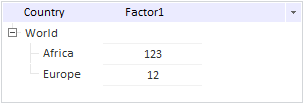
After executing the example the HTML page contains the TreeList component that looks like follows:
See also: