Find: function (sender,args)
sender. Event source.
args. Event information. Available arguments:
Cancel - determines if the operation that fired the event is to be canceled. By default it is set to false. If this parameter is set to true, the operation that has fired the event is aborted.
Value - value typed into the search line.
Column - gets index of the column in which the value is searched.
SetFocus - determines if the found element gets focus. By default this parameter is set to true, and the element gets focus.
The Find occurs when element search is started.
This event is fired after the user types in a value into the search line and presses ENTER. To open search bar, press CTRL+F or F3. One of the tree elements must be focused.
The search line opens if the TreeList.EnableSearch property is set to true.
To execute this example, the page must contain the TreeList component named treeListSett. Make sure that the TreeList.EnableSearch property is set to true. Add handlers for the events Finingd and Found, and find the element that contains the text Egypt:
//Before search the «Search <search value>» message is displayed
treeListSett.Finding.add(function (sender, args)
{
    alert("Search " + args.Value)
});
//When the node is found
treeListSett.Found.add(function (sender, args)
{
    treeListSett.setEnableHighlight(true);//enable node highlighting
    args.Node.setHighlighted(true);//set highlight for the found node
    treeListSett.setHighlightColor("LightSeaGreen");//set highlight color for the found node
    treeListSett.setHighlightFont(new PP.Font(//set highlight font for the found node
    {
        IsBold: true
    }));
  //Display search string and found node text to the console
  console.log("The last search: " + treeListSett.getLastSearch().value + "; the last found: " + treeListSett.getLastFound().getText())
})
//Search for the Egypt element
treeListSett.find("Egypt")
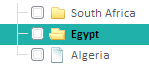
After executing the example when the search is started, the following message is shown: Finding Egypt. After the element is found it becomes highlighted:
The following message is displayed to the console:
Last searched: Egypt; last found: Egypt
See also: