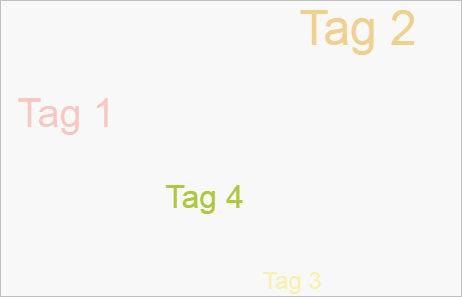
To execute the example, the HTML page must contain links to the PP.js and PP.GraphicsBase.js, PP.TagCloud.js script files and PP.css styles file in the <body> tag of HTML page of the <div> element with the tagCloud identifier. In the onload event of the <body> tag it is necessary to add the call of the createTagCloud() function. Add tag cloud on the HTML page:
function createTagCloud() {
    // Data for creating a tag cloud
    data = new PP.DataSource({
        Title: "DataSource",
        AttributesNames: {
            color: "Color",
            size: "Size",
            value: "Value"
        },
        Series: {
            "Tag1": {
                color: {
                    Items: [10.0]
                },
                size: {
                    Items: [50]
                }
            },
            "Tag2": {
                color: {
                    Items: [20.0]
                },
                size: {
                    Items: [60]
                }
            },
            "Tag3": {
                color: {
                    Items: [30.0]
                },
                size: {
                    Items: [30]
                }
            },
            "Tag4": {
                color: {
                    Items: [40.0]
                },
                size: {
                    Items: [40]
                }
            }
        }
    });
    scales = new PP.ScaleBase({
        Id: "Scale0",
        Values: [10.0, 20.0, 30.0, 40.0, 50.0],
        Items: ["#FFFF462C", "#FFEBAF36", "#FFFFD900", "#FFB1CA40", "#FF6A8535"],
        EnableEquality: false,
        NoData: "#FFBFBFBF",
        TypeArguments: "Brush"
    });
    color = new PP.ColorVisual({
        ColorMapping: new PP.DataMapping({
            DataSource: null,
            DimAttributeId: "color",
            Type: "Scale",
            Index: 0,
            DataSource: data,
            Scale: scales
        })
    });
    size = new PP.SizeVisual({
        NumericMapping: new PP.DataMapping({
            DimAttributeId: "size",
            Type: "None",
            Index: 0,
            DataSource: data
        })
    });
    // Create a tag cloud
    tagCloud = new PP.Ui.TagCloud({
        // Set parent element
        ParentNode: document.getElementById("tagCloud"),
        // Set visualizers
        Visuals: { ColorVisual: color, SizeVisual: size },
        // Set tag cloud size
        Width: 500,
        Height: 300,
        // Set tags
        ItemsNames: { Tag1: "Tag 1", Tag2: "Tag 2", Tag3: "Tag 3", Tag4: "Tag 4" },
        // Set data source
        DataSources: [data],
        // Set whether tags move on mouse hold down
        IsDragControl: true,
        // Set zoom by mouse wheel
        IsWheelZoom: true,
        // Set element sorting
        SortItems: true
    });
    // Set cylindrical form of element dispersion
    tagCloud.setShape("Cylinder");
}
As a result, tag cloud is added on the page:
Display list of items headers which are in the tag cloud:
// Display items headers:
console.log("Items: ");
var items = tagCloud.getItemsNames();
for (i in items) {
    console.log(items[i]);
}
As a result the console displays headers of the tag cloud items:
Items:
Tag 1
Tag 2
Tag 3
Tag 4
See also: