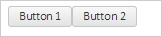
To execute the example, the HTML page must contain links to PP.js script file and to PP.css styles file, in the <body> tag of the HTML page of the <div> item with the panel identifier. In the onload event of the <body> tag it is necessary to add the call of the createPanel() function. Add the panel with two buttons on the page:
function createPanel() {
    // Create a panel
    panel = new PP.Ui.Panel({
        // Set parent item
        ParentNode: document.getElementById("panel"),
        // Set panel name
        Name: "Panel",
        // Set custom positioning of items
        IsAbsolutePositioning: false
    });
    // Create buttons
    button1 = new PP.Ui.Button({
        Content: "Button 1"
    });
    button2 = new PP.Ui.Button({
        Content: "Button 2"
    });
    // Add buttons to the panel
    panel.beginUpdate();
    panel.add(button1);
    panel.add(button2);
    panel.endUpdate();
}
As a result, the panel with two buttons is added on the page:
See also: