Add links to the following files in the HEAD tag to execute the example:
Library of the PP.js basic components.
Visual PP.css styles.
The module with the resources.ru.js (Russian resources) of the resources.en.js (English resources).
Add the following script to the SCRIPT tag to create the font settings dialog box and the button calling this dialog box:
        //create the FontDialog component
        var fontdialog = new PP.Ui.FontDialog();
        //current font settings
        fontdialog.setFont(new PP.Font({
            //name
            FontFamily: "Tahoma",
            //size
            Size: 12,
            //color
            Color: "#00BFFF",
            //do not use default color
            UseAutoColor: false,
            //bold font style
            IsBold: true,
            //italic
            IsItalic: true,
            //not strikethrough
            IsStriken: false,
            //underlined
            IsUnderline: true,
            //not superior
            IsSuperior: false,
            //not inferior
            IsInferior: false,
            //without lower case capitals
            IsLowerCapitalized: false,
            //without all capitals
            IsCapitalized: false
        }));
        //set example text
        fontdialog.setSampleTextString("Example");
        //button to open dialog
        var b = new PP.Ui.Button({
            ParentNode: document.getElementById("but1"),
            Content: "Font dialog",
            Width: 50,
            Height: 20
        });
        b.Click.add(function (sender, args) { fontdialog.show(100, 100) });
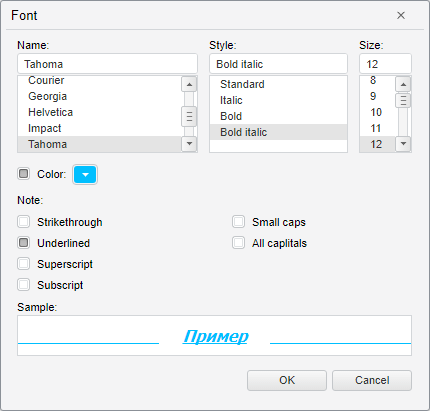
After executing the example, the HTML page contains the Font dialog button, clicking which opens the dialog box for selecting font:
See also: