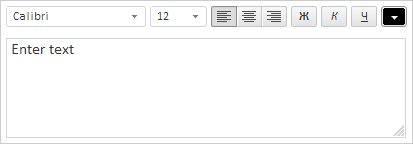
TextEditor(settings);
settings. JSON object that contains values of component properties.
The TextEditor constructor creates an instance of the TextEditor component.
To execute the example, the HTML page must contain links to PP.js, resources.ru.js files and to PP.css styles file. In the <body> tag place a block with the ID textEditorContainer that will store the created component:
<div id="textEditorContainer" style="float:left;border: #CCCCCC 1px solid; padding: 5px; margin: 5px;"></div>
Next in the <body> tag add a scenario that creates a text editor:
<script type="text/javascript">
    // Set path to resources file
    PP.resourceManager.setRootResourcesFolder("../resources/");
    PP.setCurrentCulture(PP.Cultures.ru); // Selection of language settings
    // Create an instance of the text editor
    var textEditor = new PP.Ui.TextEditor({
        ImagePath: "build/img/",
        ParentNode: document.getElementById("textEditorContainer"),
        // Contents of the text editor
        Content: "Input the text",
        // Enable to change sizes of the text editor
        EnableResize: true,
        // Height of the text area
        TextAreaHeight: 100
    });
</script>
After executing the example, the TextEditor component that looks as follows is added to the page:
See also: