PP.Ui.FontBox (settings)
settings. JSON object that contains values of component properties.
The FontBox constructor creates an instance of the FontBox class.
To execute the example it is necessary that the <head> tag of HTML pagecontains links to PP.js script file, to PP.css styles file and resources file (for example, resources.ru.js), in the <body> tag of HTML page of the <div> item with the fontBox identifier and the example must be placed in the <script> tag. In the onload event of the <body> tag it is necessary to specify the call of the createFontBox() function. Add component to setup text parameters on the page and implement a handler of the PropertyChanged and ValueChanged events:
function createFontBox() {
    // Set root folder with resources
    PP.resourceManager.setRootResourcesFolder("../build/resources");
    // Determine current culture
    PP.setCurrentCulture(PP.Cultures.ru);
    // Create a handler of the text parameters change event
    function onPropertyChanged(sender, args) {
            console.log({
                PropertyName: args.PropertyName,
                Font: args.Font,
                Alignment: args.Alignment
            });
        }
        // Create a handler of component value change event
    function onValueChanged(sender, args) {
            console.log({
                PropertyName: args.PropertyName,
                Value: args.Value,
                Font: args.Font
            });
        }
        // Create component to setup text parameters
    textSettings = new PP.Ui.FontBox({
        // Set image source
        ImagePath: "../build/img/",
        // Set parent item
        ParentNode: document.getElementById("fontBox"),
        // Set font parameters
        Font: {
            FontFamily: "Tahoma",
            Size: 36,
            Color: "#FF0000",
            IsBold: true,
            IsItalic: true,
            IsUnderline: true
        },
        // Set display of the text size bigger than 36
        IsSizeExtend: true,
        // Handle the component value change event
        ValueChanged: PP.Delegate(onValueChanged),
        // Right alignment
        Alignment: PP.HorizontalAlignment.Right,
        // Set a handler of the text parameters change event
        PropertyChanged: PP.Delegate(onPropertyChanged)
    });
}
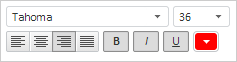
As a result of executing the example, the FontBox component with following settings is placed on the page:
Click with mouse button the drop-down menu with font sizes. In the list there are sizes bigger than 36:
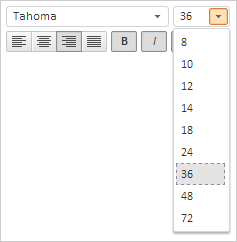
Select the 24 text size. As a result the console displays information about changes:
Object {PropertyName: "Size", Font: PP.Font, Alignment: "Right"}
Object {PropertyName: "Size", Value: 24, Font: PP.Font}
See also: