addMaster (master: PP.Ui.Master, beforeItem: PP.Ui.NavigationItem);
master. Master which panels are to be added.
beforeItem. Item before which the panels are inserted. If it is empty, the panels are added to the end.
The addMaster method adds a child master.
To execute the example, the page must contain a master named master (see Master Constructor). Add a button clicking which adds a child master:
var newMaster = new PP.Ui.Master(//child master
{
    Items: [
    {
        Title: "New Panel 1"
    },
    {
        Title: "New Panel 2"
    }]
});
var butAdd = new PP.Ui.Button(//button to add a child master
{
    Content: "Add Master",
    ParentNode: document.body,
    Click: function ()
    {
        master.addMaster(newMaster)
    }
});
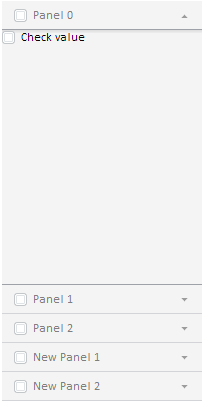
After executing the example the Add Master button is placed on the page. Clicking the button adds a master that has two tabs to the component:
See also: