getTextBox();
The getTextBox method returns text box of the entry editor.
Returned value is an object of the PP.Ui.TextBox class.
To execute the example, the <head> tag of the HTML page must contain links to PP.js script files and to PP.css styles files, in the <body> tag of the HTML page of the <div> item with the combo identifier and the example must be placed in the <script> tag. In the onload event of the <body> tag it is necessary to specify the call of the createCombo() function. Add input editor with a drop-down panel to the page and implement the ValueChanged event handler:
var combo;
function createCombo() {
    // Create input editor with a drop-down panel
    combo = new PP.Ui.Combo({
        // Set paren item
        ParentNode: document.getElementById("combo"),
        // Set width
        Width: 100,
        // Set attribute of editors creation
        NoCreateEditors: false,
        /* Set the attribute that the tooltip is visible on hovering the mouse over
        the button of the drop-down panel opening */
        IsHint: true,
        /* Set an attribute of the drop-down panel opening
        on clicking the header */
        OpenOnContentClick: true,
        /* Set an attribute of the drop-down panel opening
        on clicking the component icon */
        OpenOnIconClick: true,
        /* Set an attribute of the drop-down panel closing
        on the component contents clicking */
        CloseOnContentClick: true,
        // Set icon to the left of the component
        IconPosition: PP.LTRB.Left,
        /* Set the attribute that the drop-down width ignores
        input editor width */
        IsDropHasCombosWidth: false,
        // Set an icon of the input editor
        IconUrl: "../build/img/app/icons16x16.png",
        // Handle the event of icon clicking in the input editor
        IconClick: function(sender, args) {
            console.log("Icon is clicked in the input editor");
        },
        // Handle the event of value change in the input editor
        ValueChanged: function(sender, args) {
            console.log("Value is changed in the input editor");
        },
    });
    // Put the text in the drop-down panel
    var panel = combo.getDropPanel();
    panel.setContent("Text");
    // Set width of the drop-down panel
    panel.setWidth(200);
}
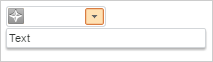
Click the input editor with a left mouse button. The OpenOnContentClick property is set to True, then drop-down panel opens. The drop-down panel is wider than input editor because the IsDropHasCombosWidth property is set to False:
Get sizes of the icon put in the input editor:
// Get sizes of the icon put in the input editor
console.log("Icon height: " + combo.getIconHeight());
console.log("Icon width: " + combo.getIconWidth());
As a result the following is displayed in the console:
Icon height: 16
Icon width: 16
Set value in the text box of the input editor and determine whether it is possible edit the contents of the input editor:
// Set text in the input editor
combo.getTextBox().setContent("Value");
//Determine whether it is possible to edit the text box of the input editor
combo.setEnableEdit(true);
Click with the mouse button on the input editor icon. The OpenOnIconClick and CloseOnContentClick properties are set to True, that is why the drop-down panel closes:

The following message is displayed in the console:
Icon in the input editor is clicked
Double click with mouse button on the input editor and change the Value 1 contents. As a result, the following message is displayed in the console:
Value is changed in the input editor
Set characters available to input in the text box of the input editor and highlighting of invalid input:
// Clear the input editor
combo.setContent("");
// Set characters available to input in the text box of the input editor
var textBox = combo.getTextBox();
textBox.setAllowedSymbols(['1', '2', '3', '4']);
// Set highlighting of invalid input
combo.applyNotValidCSS();
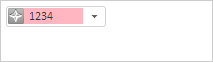
Print the 12345 text in the input editor. As a result, in the text box of the input editor there is highlighting of invalid input and there is the following text: 1234:
Set highlighting of the valid input:
// Clear the input editor
combo.setContent("");
//  Set highlighting of valid input
combo.applyValidCSS();
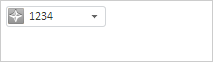
Print the 12345 text in the input editor. As a result, in the text box of the input editor there is a highlighting of valid input and there is the following text: 1234:
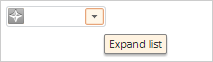
Hover the mouse cursor over the drop-down panel. As a result a tooltip is shown because the IsHint property is set to True:
Change icon of the input editor:
// Change icon of the input editor
var iconImageList = new PP.ImageList({
        //sprite source
        Source: "../build/img/app/help.png",
        //size of images in the sprite
        IconHeight: 16,
        IconWidth: 16,
    });
combo.setIconImageList(iconImageList);
As a result the icon of the input editor is changed:

See also: