To execute the example, create an HTML page and perform the following operations:
1. Add links to the styles files: PP.css, PP.Express.css, PP.Metabase.css, PP.Ufe.css.
Also, add links to the scenarios files: PP.js, PP.Metabase.js, PP.Express.js, PP.Ufe.js, resources.ru.js.
2. Executing the example requires that the repository contains an express report with the 10902 key. It is allowed to specify another existing express report in the key example.
It is also available to specify own values instead of the 104 dimension key and the 20000 element key.
3. Add a scenario creating an express report and a dialog for editing a formula of the TransformDialog express report dimension:
PP.ImagePath = "../build/img/"; // Path to images folder
PP.ScriptPath = "../build/"; // Path to scenarios folder
PP.CSSPath = "../build/"; // Path to styles files folder
function createTransformer() {
    // Set a path to the root folder containing resources files
    PP.resourceManager.setRootResourcesFolder("../build/resources/");
    // Set language  settings for resources
    PP.setCurrentCulture(PP.Cultures.ru);
    // Create a repository connection
    mb = new PP.Mb.Metabase({
        PPServiceUrl: "PPService.axd?action=proxy",
        Id: "PROGNOZPLATFORM7",
        UserCreds: {
            UserName: "user",
            Password: "password"
        }
    });
    // Open repository connection
    mb.open();
    // Create a service for working with express reports
    eaxMdService = new PP.Exp.EaxMdService({
        Metabase: mb
    });
    eaxMdService.setMetaGet(eaxMdService.getDefaultMetaGet());
    // Open a document with the 10902 key
    eaxDocument = eaxMdService.editDocument(10902);
    // Create a container for express reports
    expressBox = new PP.Exp.Ui.ExpressBox({
        // Set parent element
        ParentNode: document.body,
        // Set source
        Source: eaxDocument,
        // Set the service
        Service: eaxMdService
    });
    // Resize the ExpressBox container
    window.onresize();
    setTimeout(preloadDialog, 3000);
}
function preloadDialog() {
    // Select the Selection tab in the left panel
    expressBox.getSlidePanelViewToolBar().getItem(1).setIsChecked(True);
    // Expand the Socially Economic Indicators panel
    expressBox.getSlidePanelView().getDetailsContent().getControl().getItems()[9].expand();
    setTimeout(loadDialog, 1000);
}
function loadDialog() {
    // Create a dialog box for settings and editing a formula of express report dimension element
    dialog = new PP.Ufe.Ui.TransformDialog({
        // Set a repository connection
        Metabase: mb,
        // Set a data source
        EaxSource: expressBox.getSource(),
        // Set data of the element that will be loaded on displaying the dialog
        CurDimElementData: eaxDocument.getDims()[1].getElem("20000"),
        // Set key of the dimension, from which data is extracted
        EaxDimKey: 104,
    });
    // Display the dialog box
    dialog.showDialog();
}
var idTime;
// Function for resizing the ExpressBox container on resizing a page
window.onresize = function updateSize() {
    if (idTime)
        clearTimeout(idTime);
    idTime = setTimeout(function() {
        if (expressBox) {
            expressBox.setWidth(document.body.offsetWidth - 5);
            expressBox.setHeight(document.body.offsetHeight - 5);
        }
        idTime = null;
    }, 100);
};
4. In the <body> tag as the value of the onLoad attribute, specify name of the createTransformer() function.
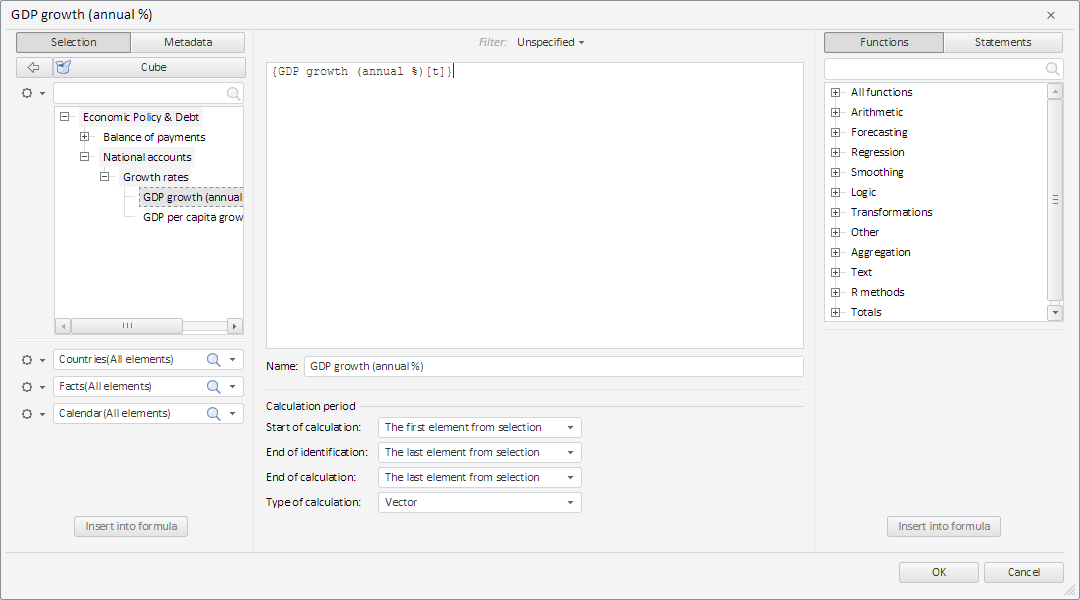
After executing the example a dialog box for creating and editing a formula of express report dimension element is created:
See also: