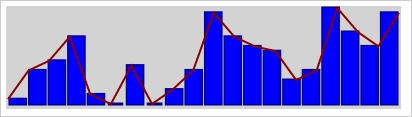
To execute the example, the HTML page must contain links to the PP.js scenario file and P.css styles file in the <body> tag of HTML document of the <div> element with the "sparkline" identifier. It is required to add calling of the createSparkline() function to the "onload" event of the <body> tag. Add a sparkline with data to HTML page:
function createSparkline() {
    // Create a sparkline
    sparkline = new PP.Ui.Sparkline({
        // Set a parent element
        ParentNode: document.getElementById("sparkline"),
        // Set size
        Width: 395,
        Height: 100,
        // Set point values
        Values: [2, 8, 10, 15, 3, 1, 9, 1, 4, 8, 20, 15, 13, 12, 6, 8, 21, 16, 13, 20],
        // Set display modes
        ViewMode: [PP.Ui.SparklineViewMode.Line, PP.Ui.SparklineViewMode.Column],
        // Set background color
        BackgroundColor: PP.Color.Colors.lightgray,
        // Set line color
        LineColor: PP.Color.Colors.darkred,
        // Set line width
        LineThickness: 2,
        // Set column color
        FillColor: PP.Color.Colors.blue,
        // Set column border color
        StrokeColor: PP.Color.Colors.darkblue,
        // Set column border width
        StrokeThickness: 3,
        // Set padding by line margins
        Padding: 2,
        // Set column rendering for all values
        UsePeakValuesToColumns: False
    });
}
As a result a new sparkline is created:
See also: