merge();
The merge method merges table cells in a given range.
To execute the example, the HTML page must contain the TabSheet component named tabSheet (see Example of Creating the TabSheet Component). Merge cells in the range A0:A1, then select this span and determine its size:
// Determine the A0:A1 range
var range = tabSheet.getRange(0, 0, 0, 1);
/* Determine the function to determine the size of
the range of merged cells */
var defineSpanSize = function (targetRange) {
    // Get the cell spans included in the range
    var spans = targetRange.getInnerSpans();
    if (spans.length > 0) {
        console.log("Number of included rows: " + spans[0].rowCount);
        console.log("Number of included columns: " + spans[0].colCount);
    } else {
        console.log("No ranges of merged cells.");
    }
}
// Merge cells in this range
range.merge();
// Select the span
range.select();
// Determine size of the span
this.defineSpanSize(range);
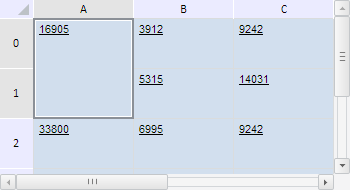
After executing the example cells in the A0:A1 range are merged and selected:
The browser console shows sizes of the merged range given as the number or rows and columns belonging to this range:
Number of rows: 2
Number of columns: 1
Now unmerge the cells in this range:
range.split();
// Check whether there merged cells
this.defineSpanSize(range);
After executing this scenario the cells in the A0:A1 range are unmerged:
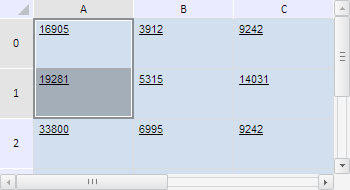
The browser console shows a message that there are no merged cell ranges.
See also: