getCutRanges();
The getCutRanges method gets ranges separated with fixation lines.
This method returns a JSON object with the following fields: tlRange - top left range, trRange - top right range, blRange - bottom left range, brRange - bottom right range, and status - splitting mode for the initial range.
To execute the example, the HTML page must contain the TabSheet component named tabSheet (see Example of Creating the TabSheet Component). Define the B1:D4 range, fix the first row and first column in this range. Set different fill colors for the ranges obtained after the initial range is split with fixation lines, find width and height for the range consisting of non-fixed cells:
// Determine the range B1:D4
var range = tabSheet.getRange(0, 0, 2, 3);
// Determine the function for table cell fill
var fill = function (range, color) {
    // Get a cell array in the range
    var cells = range.getCells();
    for (var i in cells) {
        // Get a separate cell
        var cell = cells[i];
        // Get cell style
        var style = cell.getStyle();
        style.Fill.Color = color; // Fill color
        cell.setStyle(style); // Set cell style
        // Set this style for the table cell too
        var style = tabSheet.getModel().getStylesJSON()[0];
        var coord = cell.getCoord();
        range.getTabSheet().getModel().setStyle(tabSheet.getCell(coord.rowIndex, coord.colIndex), style);
    }
};
// Fix the first row and the first column in the range
tabSheet.setFixedColumn(0);
tabSheet.setFixedRow(0);
// Determine whether fixation lines intersect the range
var isCuttedRange = range.isCuttedRange();
if (isCuttedRange) {
    // Get the ranges split with fixed rows and columns
    var cutRanges = range.getCutRanges();
    // Fill the obtained ranges with different colors
    if (range.getCutStatus() === "tblr") {
        this.fill(cutRanges.blRange, "yellow");
        this.fill(cutRanges.brRange, "red");
        this.fill(cutRanges.tlRange, "green");
        this.fill(cutRanges.trRange, "blue");
    }
    // Determine size of the obtained ranges
    var cutRangeSizes = range.getCutRangeSizes();
    /* Determine width and height of the range of non-fixed cells*/
    console.log("Non-fixed cell range width: " + cutRangeSizes.brSize.width);
    console.log("Non-fixed cell range height: " + cutRangeSizes.brSize.height);
};
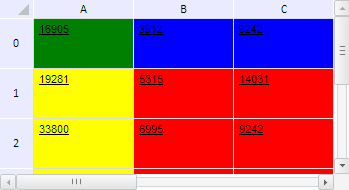
After executing the example the first row and first column in the B1:D4 range are fixed. Yellow, red, green and blue fill colors are defined for the ranges obtained after the initial range is split with fixation lines:
The browser console shows width and height of the range that consists of non-fixed cells:
Width of the range of non-fixed cells: 200
Range height: 150
See also: