autoExpand();
The autoExpand method automatically expands a range of table cells.
A cell range is expanded until it reaches an empty row or column.
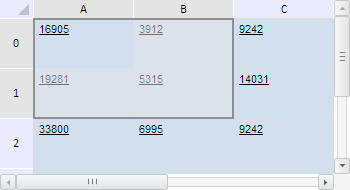
To execute the example, the HTML page must contain a component named tabSheet (see Example of Creating the TabSheet Component). Create the cell range B0:B1, automatically expand this range and select it:
// Determine function for outputting range coordinates
var wrireRangeCoord = function (range, name) {
    // Get range angle coordinates
    var coords = range.getCorners();
    console.log(name + ": (" + coords.tlCoord.rowIndex + ", " + coords.tlCoord.colIndex + ")-(" +
        coords.brCoord.rowIndex + ", " + coords.brCoord.colIndex + ")");
};
// Determine the range B0:B1
var range = tabSheet.getRange(1, 0, 1, 1);
this.wrireRangeCoord(range, "Source range coordinates");
// Automatically extend this range
range.autoExpand();
this.wrireRangeCoord(range, "Extended range coordinates");
// Select extended range
range.select();
After executing the example the B0:B1 range is automatically expanded and selected:
The browser console shows coordinates of the initial range and expanded range:
Coordinates of initial range: (0, 1)-(1, 1)
Coordinates of expanded range: (0, 0)-(1, 1)
See also: