PP.Ui.TabSheetCell(settings);
settings. JSON object that contains class properties values.
The TabSheetCell constructor creates an instance of the TabSheetCell class.
To execute the example, the HTML page must contain the TabSheet component named tabSheet (see Example of Creating the TabSheet Component). Let us create a new table cell with the coordinates (0, 1). Set a new value equal to 12 for this cell. Also perform the following operations: enable using number formats when editing, set data type, set a comment and a tooltip for this cell, and change fill type:
// Get table model
var model = tabSheet.getModel();
var oldCell = model.getCell(tabSheet.coord(0, 1));
// Create a table cell with coordinates (0, 1)
var cell = new PP.Ui.TabSheetCell({
    Parent: model,
    Data: {
        L: 1, // Column index
        T: 0 // Row index
    }
});
var coord = cell.getCoord();
if (cell.getIsEnabled()) {
    // Set a commentary for cell
    cell.setComment("(" + coord.rowIndex + ", " + coord.colIndex + ")");
    // Set a tooltip for cell
    cell.setHint(cell.getType());
    // Set cell style - select yellow fill color
    var style = cell.getStyle();
    style.Fill.Color = "#FFFACD";
    // Set style
    if (tabSheet.getChangedStyleBehavior()) {
        cell.setStyle(tabSheet.getChangedStyle().mergeStyle(style));
    }
    // Enable number fotrmat use
    tabSheet.setUseNumberFormats(true);
    // Set the Integer cell data type
    cell.setValueType(PP.Ui.TabSheetCellValueType.Integer);
    // Set a new cell value
    cell.setValue(12);
}
// Refresh table
tabSheet.rerender();
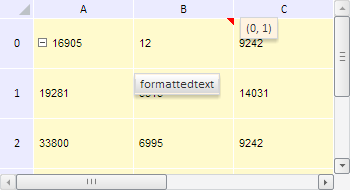
Executing this example creates a table model cell with the coordinates (0, 1). This cell is assigned the value 12, it data type is defined as Double, a comment and a tooltip are set for the cell, and table fill color changes to yellow:
See also: