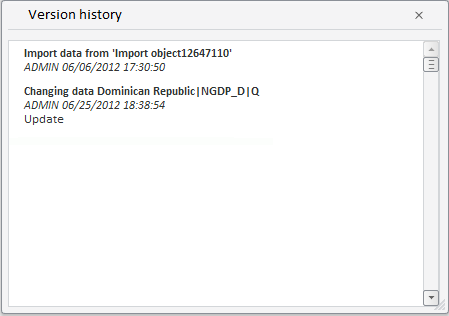
PP.TS.Ui.HistoryWindow (settings);
settings. JSON object that contains values of component properties.
The HistoryWindow constructor creates an instance of the HistoryWindow class.
To execute the example, in the HEAD tag of the HTML page specify links to the following JS files:
PP.js.
PP.Metabase.js.
PP.TabSheet.js.
PP.Express.js.
PP.TS.js.
The workbook with the 5183 key should also be available.
In the <body> tag as the value of the onLoad attribute specify name of the function executed after page body loading is finished:
<body>
	<div id='example'></div>
</body>
In the SCRIPT tag add the following script:
<script type="text/javascript">
		PP.setCurrentCulture(PP.Cultures.ru);
		//using: waiter, metabase, tsService, wbk, md, rubrs, rubKey, historyWindow;
		// Declare constants
		var KEY = 5183;//document key
			function Ready() {
			var waiter = new PP.Ui.Waiter();
			// Create repository connection
			var metabase = new PP.Mb.Metabase(
			{
				Id: "PPRepository",
				UserCreds: { UserName: "user", Password: "password" },
				StartRequest: function(){waiter.show();},
				EndRequest: function(){waiter.hide();},
				Error: function (sender, args){alert(args.ResponseText);}
			});
		// Open repository connection
		metabase.open();
		// Create a service for working with time series
		var tsService = new PP.TS.TSService({ Metabase: metabase });

		tsService.openDocument(KEY, onFirstOpened);
		// Document open event handler
		function onFirstOpened(sender, args) {
			var wbk = args.Workbook; //workbook
			var md = wbk.getWbkMetadata();
		 	var rubrs = md.rubrs.its.it;
		 	var rubKey = rubrs[0].k;

			//Create object of the PP.TS.Ui.HistoryWindow class
			var historyWindow = new PP.TS.Ui.HistoryWindow();
			//Show dialog box with point changes history
			historyWindow.showDialog();

		//Function called on completing getting time series database revisions
		var onGetRevisionsComplete = new PP.Delegate(function (sender, args) {
		 	var res = JSON.parse(args.ResponseText);
		 	var revs = res.GetRubMdResult.meta.revisions.its.it;
		 	var rubKey = args.Args.RubKey;
			//Fill revisions list
			historyWindow.getRevisionsListBox().setRevisions(revs);
	 	}, this, { RubKey: rubKey });
		//Get rubricator revisions
	 	tsService.getRevisions(wbk, rubKey, onGetRevisionsComplete);
		}
	}
</script>
After executing the example the HTML page contains a dialog box that shows point history and looks as follows:
See also: