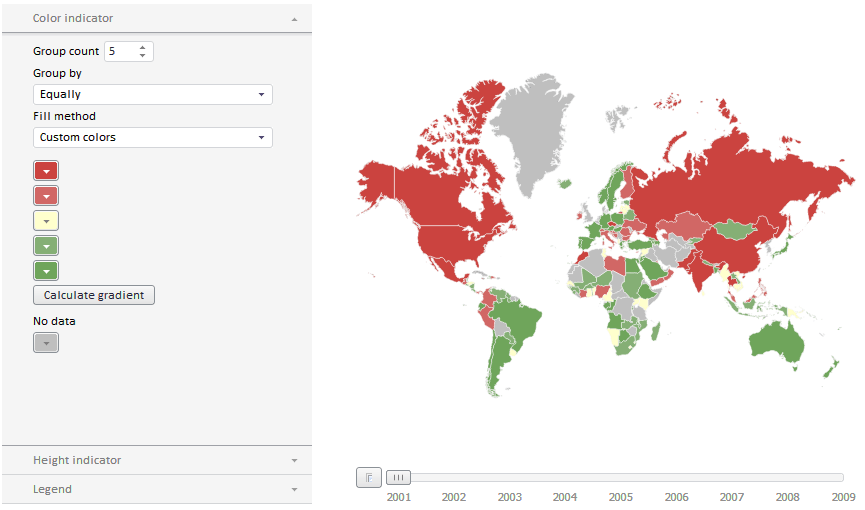
To execute the example create an HTML page and perform the following operations:
1. In the HEAD tag add links to the following CSS files: PP.css, PP.Express.css, PP.Metabase.css.
Also add links to the following JS files: PP.js, PP.ChartMaster.js, PP.MapMaster.js, PP.MapChart.js, PP.TabSheet.js, PP.Metabase.js, PP.Navigator.js, PP.Express.js, jquery.js, highcharts.src.js, and resources.ru.js.
2. In the SCRIPT tag add code to create the MapMaster and EaxMapBoxcomponents:
<script type="text/javascript">
    var eaxData;
    var idTime;
    onReady = function () {
        var IMAGE_PATH = "../../build/img/"; //path to images folder
        PP.resourceManager.setRootResourcesFolder("../resources/"); //path to resources folder
        PP.setCurrentCulture(PP.Cultures.ru); //select language settings
        var eaxAnalyzer, eaxMbService;
        //create the Waiter component used to wait for metabase connection
        waiter = new PP.Ui.Waiter();
        //Create a metabase instance
        metabase = new PP.Mb.Metabase({
            Id: "Prognozplatform_systest",
            UserCreds: { UserName: "sa", Password: "Qwerty1" },
            StartRequest: function () {
                waiter.show();
            },
            EndRequest: function () {
                waiter.hide();
            },
            Error: function (sender, args) {
                alert(args.ResponseText);
            }
        });
        //Open metabase
        metabase.open();
        //Create a service used to work with express reports
        eaxMbService = new PP.Exp.EaxMdService({ Metabase: metabase });
        //open express report with the 935529 key for edit
        eaxAnalyzer = eaxMbService.edit(935529);
        //Create a container for express report map
            mapBox = new PP.Exp.Ui.EaxMapBox({
            Source: eaxAnalyzer, // Data source
            Width: 500,
            Height: 500,
            ParentNode: "Map",
            Service: eaxMbService
        });
        //Create map wizard
        master = new PP.Ui.MapMaster({
            ParentNode: "mapM", //DOM node where chart wizard will be placed
            Height: 500,
            Width: 310,
            ImagePath: IMAGE_PATH,
            DataView: mapBox
        });
    }
</script>
3. In the BODY tag place the created components:
<body onselectstart="return false" class="PPNoSelect" onload="onReady()">
    <table style="width: 100%">
        <tr>
            <td valign="top" width="350" id="mapM">
            </td>
            <td valign="top" id="Map">
            </td>
        </tr>
    </table>
</body>
After executing the example the page contains the layout of the express report map and the master for its setup:
See also: