Executing the example requires a file containing a set of icons with "icons16x16.png" name in the build/img/app/ folder.
In the HEAD tag add links to PP.js and PP.css files.
Add the DIV element with the "example" identifier to the BODY tag.
In the SCRIPT tag add a code for creation of the ListBox component:
var listbox = new PP.Ui.ListBox({ //Create an instance of the ListBox component.
    ParentNode: document.getElementById("example"),
    ImageList: new PP.ImageList({
        //Sprite source
        Source: "../build/img/app/icons16x16.png",
        //Size of images in sprite
        IconHeight: 16,
        IconWidth: 16
    }),
    //List width.
    Width: 200
});
//Add list elements:
listbox.beginUpdate();
listbox.addItem("Navigator");
listbox.addItem("Dashboard");
listbox.addItem("Regular report");
listbox.addItem("Express report");
listbox.addItem("Workbook");
listbox.endUpdate();
//For all elements of the list set index of the column and row from the sprite:
for (var i = 0; i < listbox.getItems().length; i++) {
    listbox.getItems()[i].setColumnIndex(i);
    listbox.getItems()[i].setRowIndex(0);
};
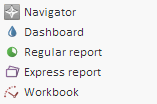
After executing the example the ListBox component will be created on the HTML page, that will look as follows:
See also: