PP.Ui.CanvasHTMLRenderer(settings);
settings. JSON object that contains values of component properties.
The CanvasHTMLRenderer constructor creates an instance of the CanvasHTMLRenderer class.
To execute the example, the HTML page must contain links to the PP.js, PP.Util.js script files, and the PP.css styles file. It is required to add calling of the createHTMLRenderer() function to the "onload" event of the <body> tag. Create a button and a class for rendering DOM tree, get graphic view of button DOM node:
function createHTMLRenderer() {
    // Create a button
    var button = new PP.Ui.Button({
        // Set parent element
        ParentNode: document.getElementById("button"),
        // Set button contents
        Content: "Button",
        // Set button width
        Width: 60
    });
    // Create a class for rendering DOM tree
    var canvas = new PP.Ui.CanvasHTMLRenderer({
        // Set image loader
        ImagePreloader: new PP.Ui.ImagePreloader(),
        // Disable autocalculation of render area size and position
        RecursiveBoundsCalc: False,
        // Disable validation test start
        TaintTest: False,
        // Y coordinate of top left area corner
        Top: 14,
        // X coordinate of top left area corner
        Left: 19,
        // Area width
        Width: 60,
        // Area height
        Height: 25,
        // Scale by the X axis
        ScaleX: 2,
        // Scale by the Y axis
        ScaleY: 2,
        // Set handler of the event that is fired after rendering is finished
        Rendered: function (sender, args) {
            // After rendering is finished, add image to the page
            button.getDomNode().insertAdjacentElement("afterEnd", args.Canvas);
            console.log("Rendering is finished");
        },
        // Set handler for the event that is fired after image loading
        Preloaded: function (sender, args) {
            console.log("Image loading is finished");
        },
    });
    // Render DOM tree
    canvas.render(button.getDomNode());
}
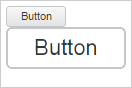
As a result a button two times larger that the normal one is rendered:
The console displays a message about loading of images and finishing of rendering:
Image loading is finished
Rendering is finished
Decrease the scale to 1 and rerender the image:
// Decrease scale
canvas.setScale(1);
// Render DOM tree
canvas.render(button.getDomNode());
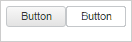
As a result the button with normal size is rendered:
See also: