ZIndex: Number;
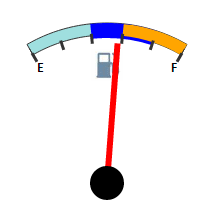
The ZIndex property sets the order for layers in a sector.
To execute the example, the page must contain the Speedometer component named speed1 (see Example of Creating a Fuel Gauge Unit). Add to the page a button, clicking which changes the order of sectors arrangement:
<input TYPE="button" VALUE="createSector" ONCLICK="createSector()">
<script>
function createSector()
{
	if (speed1.getScales(1).getSectors(1)) return;
	var sector0 = new PP.Ui.GaugeSector({
		StartValue: 0,
		EndValue: 50,
		Background: {PPType: PP.SolidColorBrush, Color: "#9FDFDF"},
		StartSize: 2,
		EndSize: 2,
		Offset: -10,
		Border: {PPType: PP.SolidColorBrush, Color: "#333333"}
	});
	var sector1 = new PP.Ui.GaugeSector({
		StartValue: 30,
		EndValue: 50,
		Background: {PPType: PP.SolidColorBrush, Color: "orange"},
		StartSize: 2,
		EndSize: 2,
		Offset: -10,
		ZIndex:10
	});
	var sector2 = new PP.Ui.GaugeSector({
		StartValue: 20,
		EndValue: 40,
		Background: {PPType: PP.SolidColorBrush, Color: "blue"},
		StartSize: 5,
		EndSize: 5,
		Offset: -10,
		ZIndex:5
	});
	speed1.getScales(1).setSector(sector0, 0);
	speed1.getScales(1).addSector(sector1);
	speed1.getScales(1).addSector(sector2);
	speed1.render(speed1, this);
}
</script>
<input TYPE="button" VALUE="setZIndex" ONCLICK="setZIndex()">
<script>
function setZIndex()
{
	if (speed1.getScales(1).getSectors(1))
	{
		var sector1 = speed1.getScales(1).getSectors(1).getZIndex();
		var sector2 = speed1.getScales(1).getSectors(2).getZIndex();
		speed1.getScales(1).getSectors(1).setZIndex(sector2);
		speed1.getScales(1).getSectors(2).setZIndex(sector1);
	}
}
</script>
Clicking the createSector button adds three overlapping sectors. Then click the setZIndex button to edit sectors arrangement.
See also: