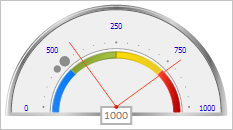
addArrow(arrow: PP.Ui.GaugeArrowBase || Array);
arrow. Arrow or arrows array to be added.
The addArrow method adds a new arrow or array of arrows to speedometer scale.
To execute the example, the page must contain the Speedometer component named speedometer (see Example of Creating a Speedometer with a Wizard).
Create new arrows. Add one of them to the scale, and replace the existing arrow with the index 0 with the other one. Change color of scale text labels. Show value of the scale's first arrow and the number of text labels. Get major and minor scale tick marks with specified indices and resize them. Get and show data on scale size and position:
// Get speedometer scale
var scale = speedometer.getScales()[3];
// Determine arrow settings
var arrowSettings = {
    Value: 300, // Arrow value
    Radius: 80, // Arrow length
    Border: { // Arrow border
        PPType: PP.SolidColorBrush,
        Color: "#ff462c"
    }
}
// Create a new arrow
var arrow1 = new PP.Ui.LineArrow(arrowSettings);
// Add an arrow to speedometer
scale.addArrow(arrow1);
// Create a new arrow
var arrow2 = new PP.Ui.LineArrow(arrowSettings);
// Set arrow value
arrow2.setValue(800);
// Set a new arrow with the 0 index
scale.setArrow(arrow2, 0);
// Set color of scale text labels
scale.setLabelsColor(PP.Color.Colors.blue);
// Output the first arrow value
console.log("First scale arrow value: " + scale.getArrowValue(scale.getArrows(0)));
// Output the number of scale text labels
console.log("Number of scale text labels: " + scale.getLabelset().length);
// Get major scale tick mark with the 1 index
var majorTick = scale.getMajorTicks(1);
majorTick.setSize(0.1);
// Get minor scale mark with the 3 index
var minorTick = scale.getMinorTicks(3);
minorTick.setSize(0.07);
// Get and output data about scale size and position
var rInfo = scale.getRenderInfo();
console.log("Scale with radii x = " + rInfo.radius.x + ", y = " + rInfo.radius.y +
  " is centered in the point (" + rInfo.center.x + ", " + rInfo.center.y + ")");
After executing the example a new arrow is added to the scale and the existing arrow is replaced. Color of scale text labels is changed, and major and minor tick marks with specified indexes are resized:
The browser console also shows value of the scale's first arrow, number of text labels and information about scale size and position:
Value of the scale's first arrow: 800
Number of scale text labels: 5
Scale with radii x = 0.95, y = 0.875 is centered in the point (110, 107)
See also: