To execute the example, create an HTML page and execute the following operations:
1. Add links to the following files: PP.css, PP.Express.css.
Also add links to the following JS files: PP.js, PP.Metabase.js, PP.Express.js, and resources.ru.js.
2. In the <head> tag specify style for the elements:
<style type="text/css">
body, html
{
    height: 100%;
    width: 100%;
    margin: 0;
    padding: 0;
    overflow: hidden;
}
</style>
3. Then in the <head> tag add a script that creates a dialog box to set up the Pareto distribution:
<script type="text/javascript">
    var metabase, eaxAnalyzer, eaxMbService, waiter, paretoDialog;
    var IMAGE_PATH = "../Debug/img/";
    var info, eax;
    function Ready() {
        // Determine language settings for resources
        PP.setCurrentCulture(PP.Cultures.ru);
        // Specify path to the root folder with resources files
        PP.resourceManager.setRootResourcesFolder("../resources/");
    }
    // Function for creating a dialog for the Top N% setting dialog of Pareto distribution
    function openDial() {
        // Create a component
        paretoDialog = new PP.Ui.ParetoDialog({
            Width: 400,
            Height: 230,
            Id: "FirstNPercent", // The Top N% setting
            ResourceKey: "ExpRibbonTableParetoDialogFirstNPercent",
            Type: "percent", // Type - percent
            LabelResourceKey: "ExpRibbonTableParetoDialogLabel",
            DescriptionResourceKey: "ExpRibbonTableParetoDialogFirstNPercentDescription"
        });
        // Display document
        paretoDialog.show();
    }
</script>
4. In the <body> tag as a value of the onLoad attribute specify name of the function that sets resources culture and sets path to the root folder that contains resources. Inside the tag add a button, clicking which creates a dialog box to set up the Pareto data distribution:
<body onselectstart="return false" class="PPNoSelect" onload="Ready()">
    <!-- Button, clicking which creates the First N% setup dialog box
         Pareto distribution -->
    <input type="button" value="Show paretoDialog" onclick="openDial()" />
</body>
5. At the end of the document insert a code that sets styles corresponding to client's operating system, to the document.body node:
<script type="text/javascript">
    PP.initOS(document.body);
</script>
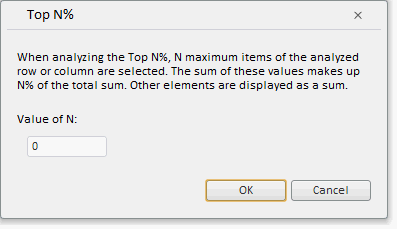
After executing the example clicking the Show paretoDialog button places the ParetoDialog component on the HTML page:
See also: